CompTIA A+ Study Guide 2026: How to Pass Core 1 and Core 2
Preparing for CompTIA A+ can feel overwhelming because there is a lot more to learn than basic computer hardware. You need to understand networking, mobile devices, operating systems, security, troubleshooting, cloud concepts, operational procedures, and how these technologies work together in real support situations.
That is why a structured CompTIA A+ study guide is more useful than randomly watching videos, reading chapters, or taking practice questions without a plan.
For 2026, CompTIA A+ requires you to pass two exams: Core 1 (220-1201) and Core 2 (220-1202). Each tests different areas of entry-level IT support knowledge, and both include scenario-based questions that require more than memorizing definitions.
This CompTIA A+ study guide 2026 will show you what to study for each exam, how to organize your preparation, how to use practice tests correctly, how to prepare for PBQs, and how to recognize when you are getting closer to exam day.
What Is the CompTIA A+ Certification?
CompTIA A+ is an entry-level IT certification focused on the practical skills used by technicians who install, configure, maintain, secure, and troubleshoot computers and other technology.
It is commonly associated with roles such as:
- Help desk technician
- IT support specialist
- Desktop support technician
- Technical support specialist
- Field service technician
- Junior IT technician
You do not need years of professional experience before studying for A+, although hands-on experience makes many concepts easier to understand.
To earn the certification, you must pass both current exams:
- CompTIA A+ Core 1: 220-1201
- CompTIA A+ Core 2: 220-1202
Think of Core 1 as being more focused on hardware, networking, devices, infrastructure, and troubleshooting, while Core 2 moves further into operating systems, security, software troubleshooting, and professional IT procedures.
CompTIA A+ Exam Overview for 2026
The current CompTIA A+ V15 series uses exams 220-1201 and 220-1202. Older 220-1101 and 220-1102 materials are from the previous exam generation and should not be your primary study source in 2026.
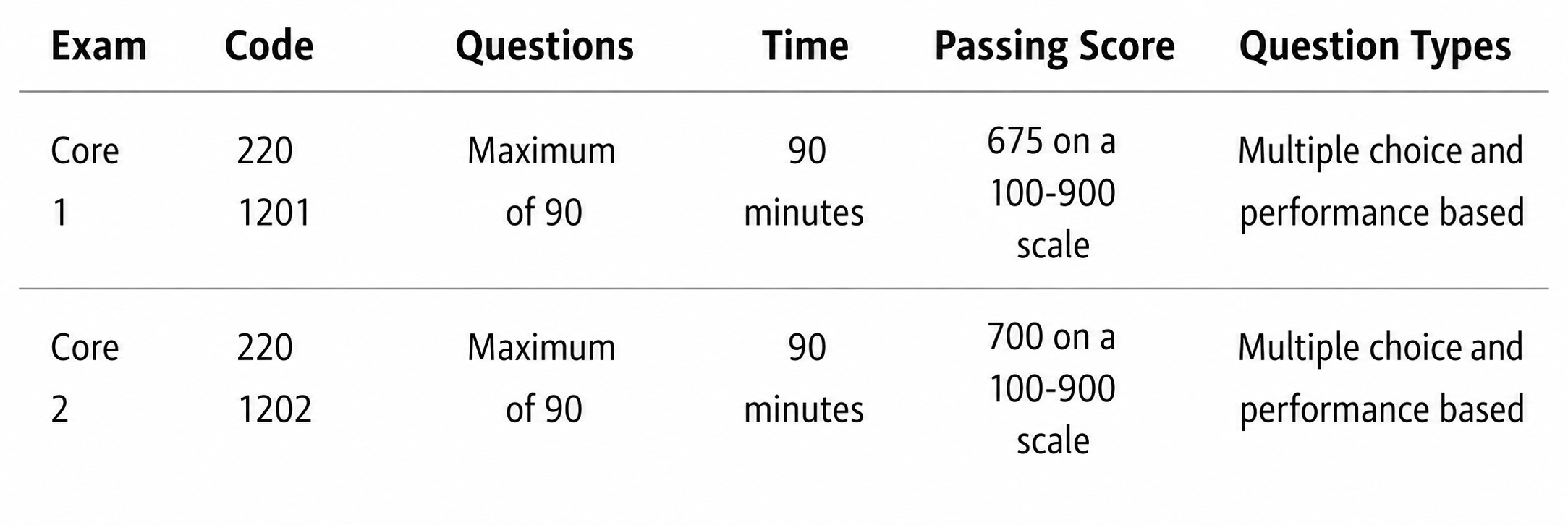
These specifications are based on the current CompTIA A+ exam objectives.
What Core 1 Covers
The current CompTIA A+ Core 1 (220-1201) domains are:
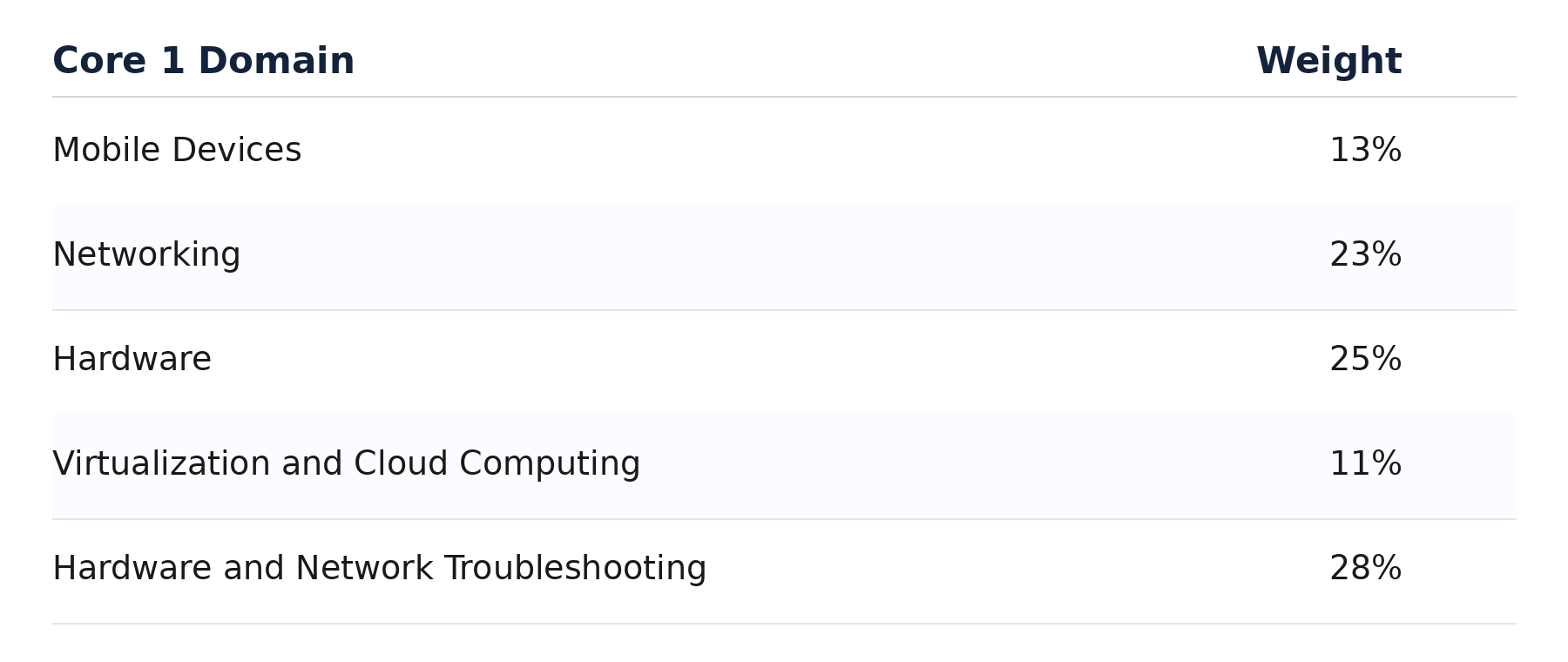
Hardware and network troubleshooting is the largest individual Core 1 domain, so you should be comfortable applying technical knowledge rather than simply recognizing terminology.
What Core 2 Covers
The current CompTIA A+ Core 2 (220-1202) domains are:
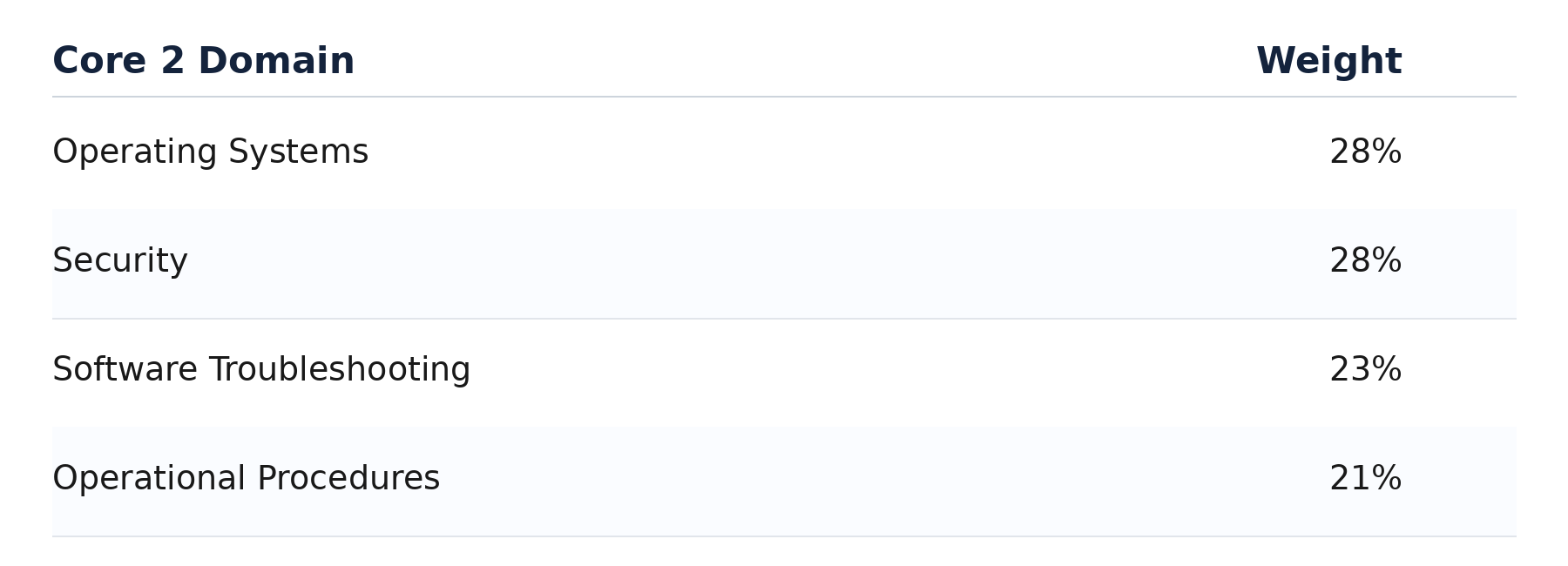
Operating Systems and Security each represent 28% of Core 2, making both major priorities.
Always use the current official exam objectives as your checklist. A course or book can explain the material, but the objectives tell you what the current exams expect you to know.
CompTIA A+ Core 1 Study Guide
A good CompTIA A+ Core 1 study guide should combine hardware knowledge with networking and troubleshooting practice.
Do not treat Core 1 as an exam where you simply memorize component names. You need to understand which technology fits a situation and what action a technician should take when something fails.
Build Hands-On Hardware Skills
Learn how common components relate to one another:
- CPUs
- Motherboards
- RAM
- Power supplies
- Storage devices
- Expansion cards
- Cooling systems
- Displays
- Printers
- Peripherals
- Cables and connectors
If possible, open an older desktop computer and identify the parts. Practice locating RAM slots, storage connections, the CPU socket, power connectors, expansion slots, and motherboard headers.
You can also practice troubleshooting mentally.
For example, suppose a desktop does not detect a newly installed storage drive. Instead of memorizing a single solution, think through possibilities:
- Is the drive receiving power?
- Is the data cable connected correctly?
- Is the device detected by firmware?
- Does the operating system recognize the drive?
- Does it need initialization or configuration?
That reasoning process is much closer to real IT support than memorizing a list of storage definitions.
Practice Networking Fundamentals
Networking is another major Core 1 area.
Make sure you understand concepts such as:
- IPv4 and IPv6
- IP addressing
- DNS
- DHCP
- Wi-Fi
- Ethernet
- Network devices
- Common ports and protocols
- Cabling
- SOHO networks
- Connectivity troubleshooting
A useful exercise is to troubleshoot your own network.
Imagine that a laptop connects successfully to Wi-Fi but cannot reach websites.
Instead of immediately blaming the wireless adapter, ask:
- Does the device have a valid IP configuration?
- Can it reach the default gateway?
- Can it reach another IP address?
- Is DNS resolution working?
- Are other devices experiencing the same problem?
This teaches you to identify symptoms and narrow down causes.
Focus on Troubleshooting
Troubleshooting deserves significant attention because Hardware and Network Troubleshooting represents 28% of Core 1.
Practice questions should force you to determine:
- What is happening?
- What is the most likely cause?
- What should be checked first?
- Which tool should be used?
- What is the appropriate next action?
When reviewing questions, do not stop at knowing the correct answer. Explain why the other options would be inappropriate for that situation.
CompTIA A+ Core 2 Study Guide
Your CompTIA A+ Core 2 study guide should shift from physical devices toward operating systems, security, software support, and professional IT procedures.
Learn Operating Systems Through Practice
Avoid learning Windows only through screenshots or definitions.
Open the operating system and practice using:
- Task Manager
- Device Manager
- Disk management tools
- System settings
- Command-line utilities
- File permissions
- Network settings
- Recovery options
- Administrative tools
Virtual machines can be especially useful because you can experiment without affecting your main computer.
Make configuration changes, observe the results, and practice fixing problems you intentionally create.
Build a Strong Security Foundation
Security represents 28% of Core 2, so it should not be treated as a small side topic.
Build a foundation in areas such as:
- Authentication
- Permissions
- Malware
- Social engineering
- Wireless security
- Physical security
- Account security
- Device hardening
- Security best practices
- Basic incident response
Focus on application.
For example, if an unauthorized person repeatedly attempts to access an employee account, you should understand which controls could reduce the risk rather than simply memorizing security vocabulary.
Practice Software Troubleshooting
Software troubleshooting questions often provide symptoms and ask for the most appropriate response.
Practice situations such as:
- An application repeatedly crashes
- A workstation becomes slow after installing software
- A computer begins displaying unexpected pop-ups
- A user cannot access a network resource
- An operating system fails to boot normally
- A configuration change causes unexpected behavior
Ask yourself what changed, which symptoms matter, and which action would logically help isolate the cause.
Understand Operational Procedures
Operational Procedures accounts for 21% of Core 2, so do not ignore it because it appears less technical.
Study concepts involving:
- Documentation
- Change management
- Safety
- Environmental procedures
- Backups
- Professional communication
- Incident handling
- Licensing
- Basic scripting concepts
- Remote support procedures
Real IT technicians are expected not only to solve technical problems but also to document changes, protect users and data, follow procedures, and communicate clearly.
How to Study for CompTIA A+ Step by Step
If you are wondering how to study for CompTIA A+, use a repeatable process instead of switching between resources randomly.
Step 1: Download and Review the Exam Objectives
Use the current objectives for 220-1201 and 220-1202 as your master checklist.
Mark each objective as:
- Comfortable
- Needs review
- New to me
This immediately gives your preparation structure.
Step 2: Establish Your Baseline
Take diagnostic questions or an initial practice test before doing weeks of studying.
Do not worry if the score is low.
The purpose is to discover whether networking, hardware, operating systems, security, or another area needs more attention.
Step 3: Study One Objective Group at a Time
Avoid trying to learn an entire domain in one session.
Break large topics into manageable blocks.
Instead of studying “Networking” tonight, study something specific such as:
- IP configuration
- Wireless standards
- Network devices
- Ports and protocols
Smaller study sessions make progress easier to measure.
Step 4: Add Hands-On Practice
Whenever possible, perform the task you are learning.
You can practice using:
- Your personal computer
- An older desktop or laptop
- Virtual machines
- Windows settings
- Command-line tools
- Network utilities
- Router configuration pages
- Troubleshooting exercises
Even simple experiments help turn theoretical knowledge into usable skills.
Step 5: Use Practice Questions
After studying a group of objectives, answer targeted CompTIA A+ practice questions.
Questions help reveal the difference between recognizing information and actually being able to use it.
Step 6: Review Every Incorrect Answer
This is one of the most important parts of your CompTIA A+ study plan.
For every mistake, determine:
- Why your answer was wrong.
- Why the correct answer works.
- Which exam objective is being tested.
- Whether the problem came from missing knowledge or misreading the scenario.
Step 7: Repeat Weak Areas
Do not spend equal time on everything.
If you consistently perform well with hardware but struggle with networking, move more study time toward networking.
Targeted revision is usually more productive than restarting your entire course.
Sample CompTIA A+ Study Plan
Here is an example 8-week CompTIA A+ study plan for someone preparing for both exams.
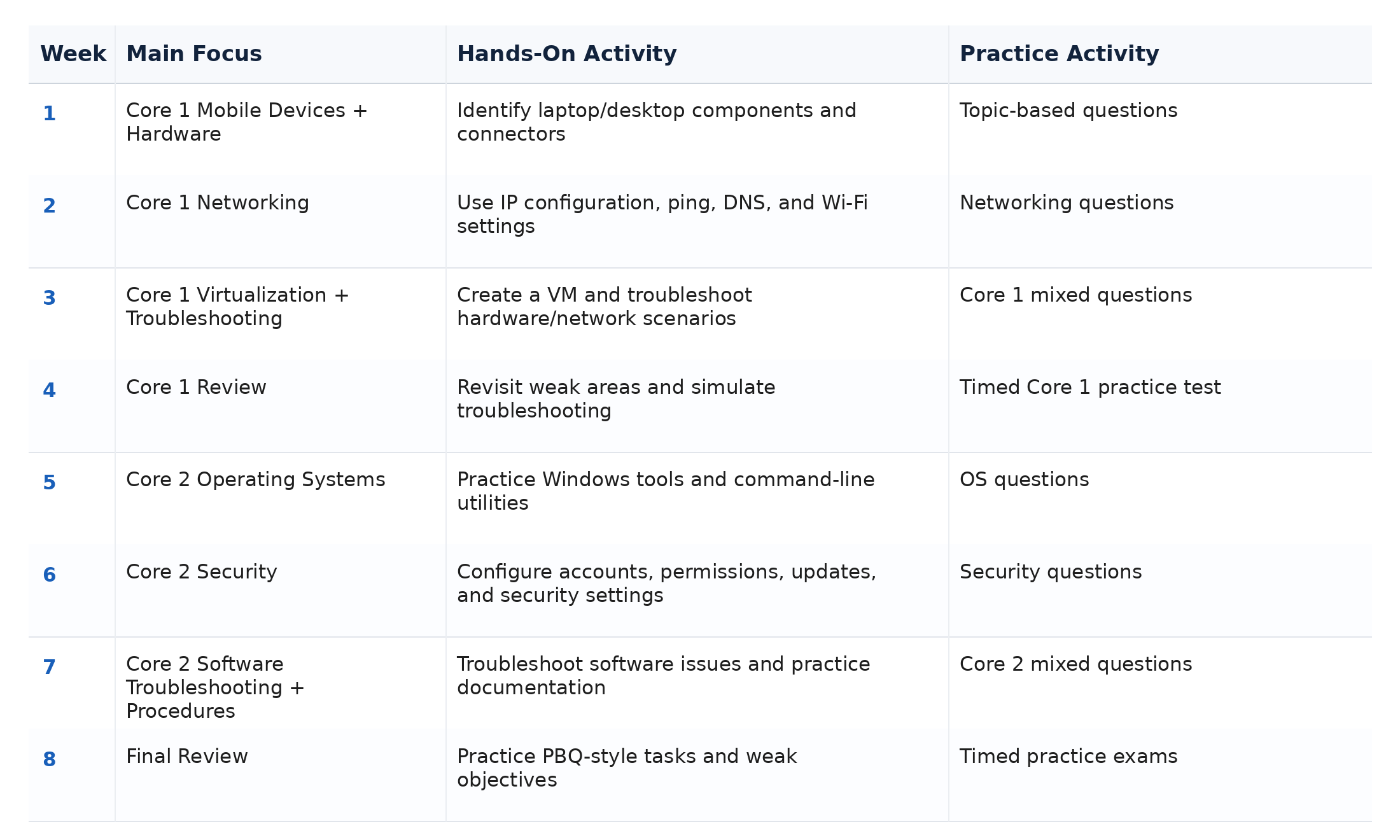
This is an example, not a promise that everyone will be prepared within eight weeks.
If you have 30 minutes per day, extend the plan and focus on one small objective at a time.
If you have 1–2 hours per day, divide sessions between learning, hands-on practice, and questions.
If you already have IT experience, spend less time reviewing familiar fundamentals and more time identifying objective-specific gaps.
If you have no professional IT experience, allow more time for hands-on practice instead of trying to compensate by memorizing definitions.
How to Use a CompTIA A+ Practice Test Effectively
A CompTIA A+ practice test becomes less useful if you repeatedly take the same exam until you remember the answers.
Use this process instead:
- Take a diagnostic test.
- Identify weak objectives.
- Study those objectives.
- Complete targeted practice questions.
- Read explanations for correct and incorrect options.
- Take another timed practice exam.
- Compare your performance.
- Repeat the process where needed.
Suppose you repeatedly miss questions about DNS, DHCP, and IP configuration.
Taking another full 90-question practice test immediately may not solve the problem.
Spend time reviewing those networking concepts, perform a few command-line exercises, answer targeted networking questions, and then return to a mixed exam.
The goal is knowledge improvement, not simply producing a higher practice score.
Realistic practice questions can also help you become more comfortable with scenarios where several answers appear technically possible but only one best fits the situation.
How to Prepare for CompTIA A+ PBQs
Performance-based questions, or PBQs, test your ability to apply technical knowledge in a task or scenario.
You do not need access to real exam questions to prepare effectively.
Practice skills such as:
- Troubleshooting a network problem
- Configuring an operating-system setting
- Matching cables and connectors
- Identifying computer components
- Working through a security scenario
- Selecting troubleshooting steps
- Interpreting system information
- Choosing appropriate configuration settings
When approaching a PBQ, first determine what the task is asking you to accomplish.
Then separate useful information from distractions.
If a task contains several components, complete the parts you understand first and return to uncertain items if time permits.
Most importantly, practice doing things rather than only reading about them.
Memorization vs. Understanding: What Actually Matters?
Some CompTIA A+ information does require memorization.
Examples include:
- Common ports
- Acronyms
- Connector characteristics
- Commands
- Technical terminology
- Hardware specifications
However, memorization alone is not enough.
Understanding becomes especially important for:
- Troubleshooting
- Security scenarios
- Network problems
- Hardware selection
- Operating-system configuration
- Operational procedures
You might memorize what DHCP does, but you also need to recognize symptoms that could appear when a device does not receive a valid address.
You might memorize cable standards, but you should also understand which cable or connector is appropriate in a particular situation.
Learn facts, then practice applying them.
Common CompTIA A+ Study Mistakes
Using Outdated Materials
Make sure your primary resources cover 220-1201 and 220-1202, not the retired 220-1101 and 220-1102 series.
Ignoring the Official Objectives
A resource can be excellent while still leaving gaps. Use the objectives as your checklist.
Only Watching Videos
Watching someone configure or troubleshoot a system is not the same as doing it yourself.
Add hands-on exercises.
Memorizing Practice-Test Answers
If you recognize an answer because you remember where it appeared on the page, you are not testing your knowledge anymore.
Focus on the reasoning.
Ignoring PBQs
Multiple-choice preparation alone may leave you uncomfortable with interactive tasks.
Practice technical workflows.
Avoiding Weak Topics
Weak objectives usually do not improve by being ignored.
Spend additional sessions on them.
Using Too Many Resources
Constantly changing books, video courses, apps, and question banks can create repetition without progress.
Choose a manageable set of resources and work through them systematically.
Studying Both Cores Without Structure
You can study both, but keep your notes and objective tracking organized by exam.
Booking the Exam Too Early
A scheduled date can create motivation, but it should not replace actual preparation.
Cramming
CompTIA A+ covers too many practical concepts for last-minute memorization to be an effective primary strategy.
How to Know When You Are Ready for the CompTIA A+ Exam
No practice-test percentage can guarantee that you will pass.
Instead, look for several indicators together:
- You can explain important concepts without looking at notes.
- You understand why answers are correct and incorrect.
- Your results are reasonably consistent across domains.
- You can troubleshoot unfamiliar scenarios logically.
- You can manage timed practice questions.
- You have performed hands-on tasks.
- You know which topics remain weak.
- You are no longer relying primarily on memorized question answers.
Your goal is not perfection.
Your goal is to reach a point where unfamiliar scenarios can still be approached using the knowledge and troubleshooting skills you have developed.
What to Do During the Final Week Before the Exam
The final week should mainly be about consolidation.
Review Weak Objectives
Use your practice results to identify the topics that still cause problems.
Complete Targeted Practice
Work on those weak areas before taking another full exam.
Review Important Commands, Ports, and Terminology
Use flashcards or short recall sessions for material that requires memorization.
Practice Troubleshooting Scenarios
Ask yourself:
- What is the symptom?
- What changed?
- What is the likely cause?
- What should I check next?
Avoid Learning Huge New Topics
If possible, avoid trying to absorb entire new domains in the final days.
Prepare Exam-Day Logistics
Confirm your testing arrangements and make sure you understand the requirements for your exam appointment.
Rest
Studying while exhausted is unlikely to improve your performance. Give yourself enough time to sleep and arrive able to concentrate.
Core 1 vs. Core 2: Which Should You Take First?
You must pass both 220-1201 and 220-1202, but there is no requirement that Core 1 must always be completed first. Current exam-preparation references confirm candidates can take the two exams in either order.
Many beginners still choose Core 1 first because hardware and networking provide useful foundations for understanding computers and IT infrastructure.
However, someone with stronger operating-system and security experience may prefer Core 2 first.
A practical rule is simple:
Prepare thoroughly for one core, pass it, and then focus your attention on the other.
That can be easier than trying to remain equally prepared for both exams at the same time.
Is CompTIA A+ Hard for Beginners?
CompTIA A+ can be challenging for beginners because of the breadth of material, not because every individual concept is extremely advanced.
You may need to learn everything from laptop hardware and Wi-Fi troubleshooting to Windows administration, malware, virtualization, documentation, and network configuration.
That can feel like a lot at first.
The solution is to divide the objectives into smaller topics and study consistently.
Troubleshooting questions are often more challenging than definition questions because you must interpret symptoms and choose an appropriate response.
That is also why hands-on experience matters.
You do not need to know everything before starting. You need a study process that gradually turns unfamiliar objectives into skills you can explain and use.
Frequently Asked Questions About the CompTIA A+ Study Guide
How long should I study for CompTIA A+?
There is no single preparation period that works for everyone. Your schedule depends on your IT experience, available study time, learning speed, and existing knowledge.
A beginner should generally expect to spend more time practicing than someone already working in technical support.
Is CompTIA A+ difficult to pass?
CompTIA A+ is achievable for beginners, but the amount of material makes preparation important. Scenario-based troubleshooting can be more difficult than simple terminology questions.
Should I study Core 1 and Core 2 at the same time?
You can, but many learners find it easier to focus primarily on one core at a time. This reduces the number of unrelated topics you need to retain simultaneously.
Which CompTIA A+ exam should I take first?
There is no required order. Many candidates begin with Core 1 because it covers hardware and networking foundations, but you can choose the exam that best matches your preparation.
Are CompTIA A+ practice tests worth using?
Yes, when they are used to identify weaknesses and practice decision-making rather than memorize answers.
A good CompTIA A+ practice test should help you understand why an answer is correct and which objective needs additional study.
How should I prepare for CompTIA A+ PBQs?
Practice actual technical tasks whenever possible. Configure settings, troubleshoot connectivity, work with virtual machines, identify hardware, and practice step-by-step problem solving.
Can I pass CompTIA A+ without IT experience?
Professional experience is not a mandatory prerequisite for beginning your preparation. However, beginners should compensate for limited experience with additional hands-on practice.
Do I need hands-on labs for CompTIA A+?
You can learn concepts from books and videos, but hands-on exercises make troubleshooting, configuration, and PBQ-style tasks easier to understand.
Even a personal computer and virtual machine can provide useful practice.
How many hours per day should I study for CompTIA A+?
Consistency matters more than choosing a perfect number.
Thirty focused minutes every day can be more useful than an irregular six-hour study session once every two weeks.
Choose a schedule you can sustain.
What should I do if I keep failing CompTIA A+ practice tests?
Stop repeatedly taking the same full practice test.
Break your results down by objective, study the weakest areas, complete targeted questions, review explanations, and then attempt another timed exam.
Your incorrect answers should become a study map.
Final CompTIA A+ Study Tips
Passing CompTIA A+ is easier to approach when you stop treating it as one enormous collection of facts.
Use the current CompTIA A+ study guide approach:
- Follow the current 220-1201 and 220-1202 exam objectives
- Break domains into smaller topics
- Build hands-on skills
- Practice troubleshooting
- Use targeted practice questions
- Review every mistake
- Prepare specifically for PBQs
- Repeat weak objectives
- Use timed practice tests when you are ready to measure progress
The goal is not to memorize an answer bank. It is to understand enough about hardware, networking, operating systems, security, and troubleshooting that you can work through unfamiliar scenarios logically.
Once you have studied the concepts, the next step is to test your knowledge under realistic conditions.
Globalcerts CompTIA A+ practice exams and training resources can help you identify weak areas, practice scenario-based questions, prepare for PBQ-style tasks, and become more comfortable working through timed Core 1 and Core 2 questions.
Use practice as feedback, continue reviewing what you miss, and keep your preparation focused on the current exam objectives.