CompTIA Help Number: How to Contact CompTIA Support in 2026
If you are searching for the CompTIA help number, the right contact method depends on the problem you are trying to solve. CompTIA handles certification-program issues such as account access, certification records, renewal questions, and many voucher or purchase concerns. Pearson VUE, meanwhile, handles major parts of CompTIA exam scheduling and delivery.
There is not one phone number that is appropriate for every CompTIA-related problem. For certification or account assistance, the safest starting point is the official CompTIA Customer Support/Help Center. For scheduling, rescheduling, test-center problems, or OnVUE online testing issues, use Pearson VUE’s CompTIA-specific support options. Pearson VUE currently publishes regional phone and chat support for CompTIA candidates.
This guide explains who to contact, what information to prepare, and how to resolve common CompTIA support problems without wasting time contacting the wrong organization.
CompTIA Help Number: What Is the Best Way to Contact CompTIA?
The best way to contact CompTIA depends on whether your problem concerns your certification program or the delivery of your exam.
For issues involving your CompTIA account, certification record, renewal, training product, or a purchase made through CompTIA, start with CompTIA Customer Support or the CompTIA Help Center. Pearson VUE’s official CompTIA testing page specifically directs candidates to CompTIA Customer Support for CompTIA-related assistance.
For problems involving an exam appointment, testing center, scheduling system, or OnVUE online exam, Pearson VUE is usually the more appropriate contact.
A useful rule is:
- CompTIA: certification, account, renewal, program, and CompTIA-purchase questions
- Pearson VUE: exam scheduling, rescheduling, cancellation, testing-center, and online exam-delivery problems
- Voucher seller: some voucher purchase or fulfillment issues, especially when the voucher came from a third-party provider
Is There a CompTIA Phone Number?
People frequently search for a CompTIA phone number, CompTIA support number, or CompTIA customer service number, but it is important not to confuse CompTIA customer support with Pearson VUE exam support.
Pearson VUE’s current CompTIA program page links candidates to official CompTIA Customer Support, but the page does not publish one universal CompTIA-owned customer service number for every certification issue. For CompTIA account or certification problems, using the official CompTIA Help Center is therefore a reliable starting point rather than relying on an unverified number found elsewhere online.
Pearson VUE does publish regional phone numbers for CompTIA exam-delivery support. As of its March 12, 2026 update, examples include:
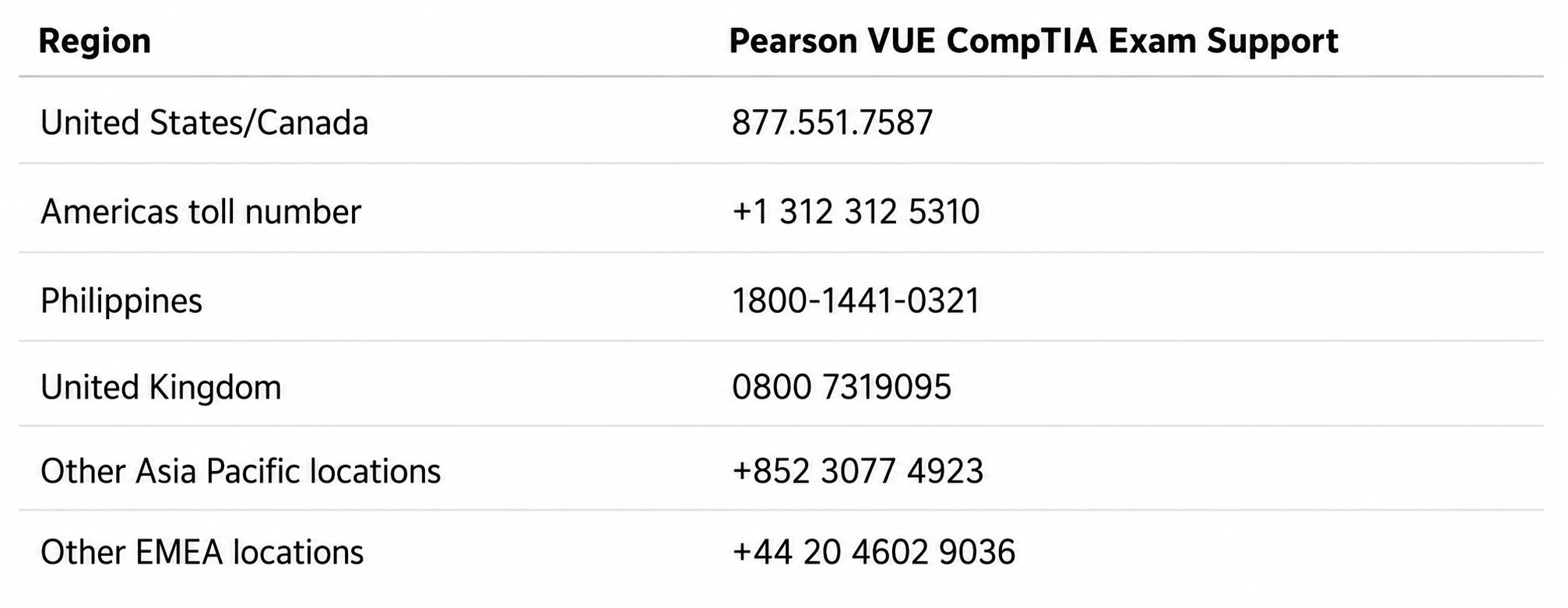
These are Pearson VUE exam-support numbers, not a general CompTIA customer service number.
Pearson VUE lists additional country-specific numbers, so candidates outside these locations should confirm the current regional option before calling.
When Should You Use the CompTIA Help Center?
The CompTIA Help Center is generally the better place to start when your problem involves the certification program rather than the delivery of a particular exam.
Examples may include:
- Problems accessing your CompTIA account
- Certification records that appear incorrect
- Certification status questions
- Continuing Education or renewal issues
- CompTIA Store purchases
- Training products
- Account or profile concerns
- Questions that require CompTIA to investigate your candidate record
When submitting a help request, provide enough information for support to identify the issue without including unnecessary sensitive information.
What Can CompTIA Customer Support Help With?
CompTIA Account and Login Problems
If you cannot access your account, begin with the available password or account-recovery options.
If those steps do not work, contact CompTIA account support and explain what happens when you attempt to sign in. Include the email address associated with the account, your candidate ID if available, and any relevant error message.
If you suspect that you accidentally created multiple candidate profiles, mention that in your request rather than creating additional accounts.
CompTIA Certification and Certificate Problems
Contact CompTIA if your concern involves the actual certification record rather than an exam appointment.
For example, you may need help if:
- A certification is missing from your account
- Certification information appears incorrect
- Your certification status is not what you expected
- You need help accessing certification information
- There is an issue with your candidate record
Gather your candidate ID, certification name, exam date, and any score-report information that may help support investigate the record.
CompTIA Voucher Problems
Voucher problems require a little more investigation because responsibility may depend on where the voucher was purchased.
Pearson VUE confirms that CompTIA candidates can enter a voucher or promotional code during the payment process. Candidates booking by phone can also tell the Pearson VUE representative that they have a voucher.
If your voucher does not work:
- Copy and paste the code rather than typing it manually.
- Confirm that you are scheduling the correct exam.
- Check any expiration or eligibility information supplied with the voucher.
- Confirm where you purchased it.
- Contact the seller if the voucher was never delivered or appears to have been supplied incorrectly.
- Contact the appropriate exam-support channel if the problem occurs while applying a valid voucher during scheduling.
Do not assume every voucher problem belongs to the same support team.
CompTIA Exam Registration and Scheduling Problems
CompTIA candidates currently begin the scheduling process through CompTIA Central, which redirects them into the testing workflow used for scheduling, rescheduling, or cancelling an exam.
If you can access your CompTIA account but encounter a problem with appointment availability, rescheduling, cancellation, or the test-delivery process, Pearson VUE support is normally the relevant exam-support channel.
CompTIA Continuing Education and Renewal Questions
Questions about Continuing Education, certification renewal, renewal status, or certification records belong on the CompTIA side rather than with Pearson VUE’s exam-delivery support.
If your concern is specifically about a scheduled certification exam you are taking as part of your certification journey, however, the scheduling or delivery portion may still be handled through Pearson VUE.
CompTIA vs Pearson VUE: Who Should You Contact?
One of the easiest ways to get faster support is to contact the organization responsible for the problem.
Pearson VUE provides the testing infrastructure used to schedule and deliver CompTIA certification exams, while CompTIA manages the certification program itself. Pearson VUE’s CompTIA page directs candidates through CompTIA Central for appointment management and provides dedicated testing support, including OnVUE assistance.
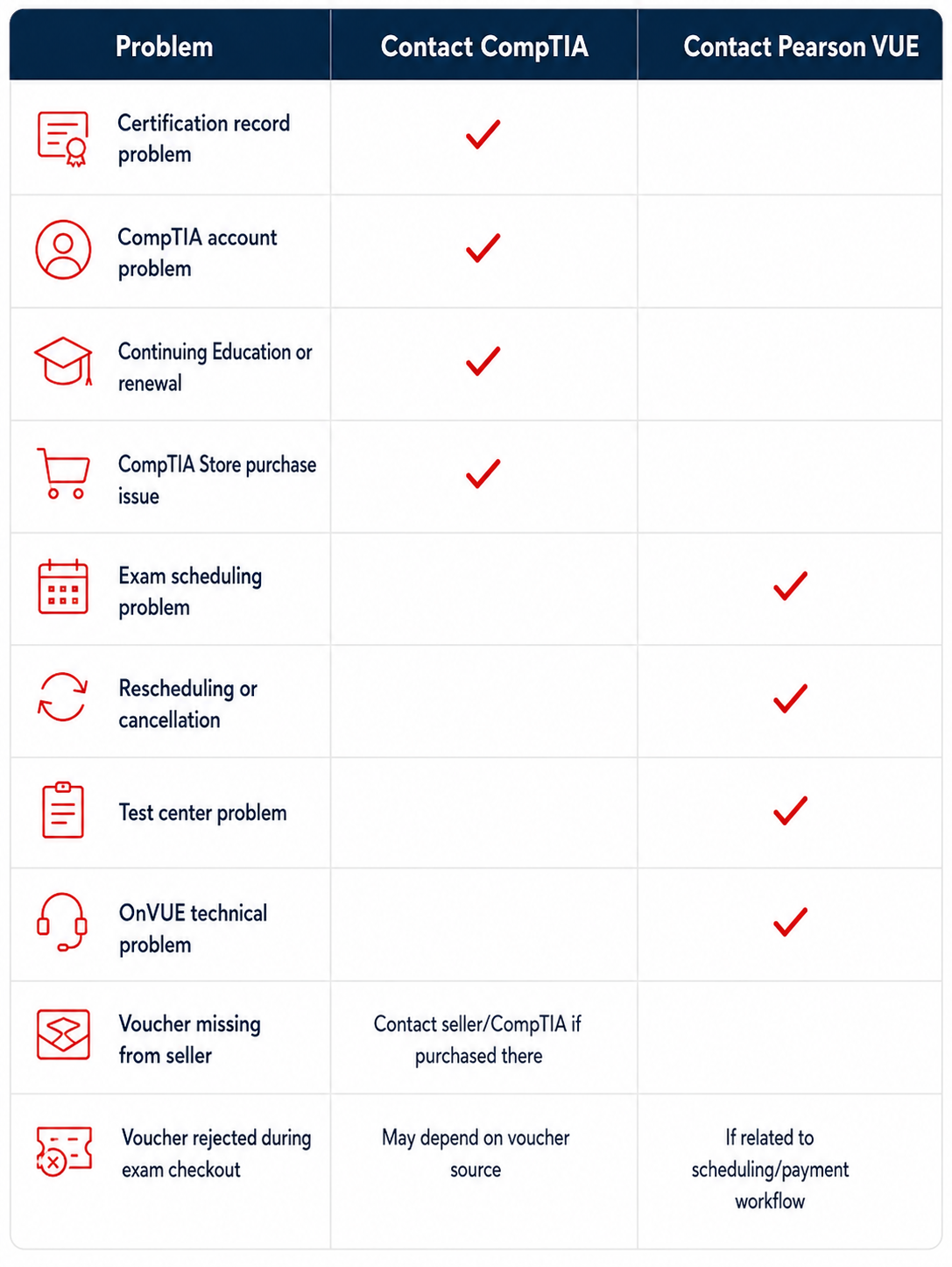
Pearson VUE also recommends its program-specific customer service channels for exam-specific assistance rather than using generic test-taker support.
How to Contact CompTIA Support Step by Step
Step 1: Identify Your Problem
First decide whether your issue involves:
- Your CompTIA account
- Certification status
- Continuing Education
- A voucher
- A purchase
- Exam scheduling
- An exam appointment
- A testing center
- An OnVUE online exam
Correctly categorizing the issue can prevent your request from being routed between support teams.
Step 2: Gather Your Candidate Information
Before contacting support, prepare the information that is relevant to your problem:
- Full name
- Candidate ID, if available
- CompTIA certification or exam name
- Exam appointment date and time
- Voucher or order information
- Transaction date
- Relevant error message
- Screenshot of the problem when appropriate
- Previous case or reference number
Do not post passwords, complete payment-card numbers, government ID numbers, or other sensitive information publicly.
Step 3: Choose the Correct Support Channel
Use CompTIA Customer Support for certification and account matters.
Use Pearson VUE’s CompTIA customer service for exam appointment and delivery issues.
For an OnVUE problem, Pearson VUE specifically recommends using the support options associated with the CompTIA OnVUE experience, including chat.
Step 4: Describe the Problem Clearly
Avoid sending a vague message such as:
“My voucher doesn’t work. Please fix it.”
A more useful request would be:
“I am trying to schedule the CompTIA Security+ exam. My voucher is rejected during checkout. I confirmed the exam and copied the voucher directly from my purchase email. The voucher was purchased on [date]. The error shown is [error message].”
That gives support enough information to understand the problem without exposing unnecessary personal data.
Step 5: Keep Your Case or Reference Number
Save:
- Confirmation emails
- Case IDs
- Chat transcripts when available
- Appointment confirmations
- Voucher purchase records
- Support replies
If the issue requires follow-up, these records make it easier to continue the same case rather than starting again.
Common CompTIA Support Problems and What to Do
My CompTIA Voucher Is Not Working
First confirm that you copied the code correctly and selected the intended exam.
Then check the voucher information you received for expiration dates, exam restrictions, region restrictions, or other conditions.
If the voucher was purchased from another training company or reseller, contact that seller about delivery or purchase problems. If the voucher appears valid but fails during the Pearson VUE scheduling/payment workflow, contact the appropriate exam-support channel.
I Cannot Schedule My CompTIA Exam
Sign in through CompTIA Central and confirm that you can reach the scheduling workflow. Pearson VUE’s CompTIA page currently directs candidates through CompTIA Central to schedule, reschedule, and cancel exams.
If your candidate account itself is inaccessible, contact CompTIA.
If the problem occurs during appointment selection or the Pearson VUE testing process, contact Pearson VUE.
I Cannot Access My CompTIA Account
Try the normal sign-in recovery options before opening a support case.
If the problem continues, gather:
- Your account email
- Candidate ID if known
- The approximate date you last accessed the account
- The error message
- A screenshot if useful
Then submit the problem through CompTIA’s official support channel.
My Certification Is Missing From My Account
Gather your candidate ID, certification name, exam date, and score information before contacting CompTIA certification support.
Do not create a second account simply because you cannot see the certification. A duplicate profile could make troubleshooting more complicated.
My Online Exam Had a Technical Problem
For an OnVUE online exam, Pearson VUE is the relevant test-delivery support provider. Pearson VUE’s CompTIA page specifically provides OnVUE support and recommends its chat option for assistance.
Keep your appointment details, case number, screenshots when appropriate, and any messages shown by the testing software.
If an issue occurs during an online exam and the software still allows communication with the proctor, follow the instructions provided through the testing interface.
My Name Is Incorrect on My CompTIA Account
Address name or identity-information problems before exam day whenever possible.
Testing programs use identity information to verify candidates, and Pearson VUE provides candidate ID policies through the CompTIA testing page.
If the incorrect information is part of your CompTIA profile or candidate record, contact CompTIA support and ask what documentation or correction process applies to your situation.
What Information Should You Have Before Contacting CompTIA?
Use this quick checklist:
- Your full name
- Candidate ID, if known
- Account email
- Certification or exam name
- Exam date and appointment details
- Voucher or order number when relevant
- Date of purchase or transaction
- Exact error message
- Screenshot when useful
- Previous case number
- A short explanation of what you already tried
Providing relevant details in the first request can reduce unnecessary back-and-forth.
How to Get a Faster Resolution From CompTIA Support
You cannot guarantee how quickly a support issue will be resolved, but you can make the request easier to investigate.
Choose the correct support category. A scheduling problem sent to certification support may require additional routing.
Include specific dates and identifiers. “My exam disappeared” is less useful than identifying the exam, appointment date, and candidate account involved.
Describe the error exactly. Copy the wording rather than paraphrasing it when possible.
Avoid creating duplicate cases unnecessarily. Continue using the existing case number when the support team asks for more information.
Keep documentation. Save receipts, voucher messages, exam confirmations, and support correspondence.
Respond promptly when support requests additional information.
Most importantly, remember the distinction between CompTIA certification support and Pearson VUE exam-delivery support.
Preparing for Your CompTIA Exam After the Issue Is Resolved
Once your account, scheduling, or voucher problem is resolved, shift your attention back to exam preparation.
A practical preparation process includes:
- Reviewing the official exam objectives
- Identifying weaker exam domains
- Practicing scenario-based questions
- Completing timed practice exams
- Reviewing explanations for incorrect answers
- Practicing performance-based question concepts where applicable
- Revisiting topics you consistently miss
Globalcerts provides certification training and practice resources for candidates preparing for credentials such as CompTIA A+, Network+, Security+, CySA+, PenTest+, Linux+, and Cloud+.
Preparing for a CompTIA certification exam? Explore Globalcerts practice exams and study resources to strengthen your preparation before test day.
Frequently Asked Questions About the CompTIA Help Number
What is the CompTIA help number?
There is no single phone number that should be used for every CompTIA-related issue. For certification and account problems, start with the official CompTIA Customer Support/Help Center. For exam scheduling and delivery, Pearson VUE provides regional CompTIA support numbers.
How do I contact CompTIA customer service?
Use the official CompTIA Customer Support or Help Center for account, certification, renewal, and related program issues. Pearson VUE’s CompTIA testing page also directs candidates to CompTIA Customer Support for those needs.
Does CompTIA have a customer service phone number?
Support channels can vary by issue and region. Rather than relying on an unverified CompTIA customer service number, start with CompTIA’s official support portal. Pearson VUE separately publishes phone numbers for CompTIA exam-delivery support.
Where can I find the CompTIA Help Center?
CompTIA’s official customer-support resources are accessible through the CompTIA support area. Pearson VUE’s CompTIA program page also provides a direct route to CompTIA Customer Support.
Should I contact CompTIA or Pearson VUE about my exam?
Contact Pearson VUE for scheduling, rescheduling, cancellation, testing-center, and OnVUE delivery problems. Contact CompTIA for certification-program, account, certification record, and Continuing Education issues.
Who do I contact if my CompTIA voucher is not working?
It depends on where the problem originated. If the voucher was not delivered or appears incorrect, contact the seller. If the voucher appears valid but fails during the Pearson VUE scheduling process, contact exam support and retain your voucher purchase information.
Who should I contact if I cannot schedule my CompTIA exam?
Candidates currently enter the scheduling process through CompTIA Central. If the problem concerns the appointment or testing workflow after you access the system, Pearson VUE is generally the appropriate exam-support provider.
What information should I have before contacting CompTIA support?
Prepare your full name, candidate ID if available, account email, certification or exam name, relevant dates, voucher or order information, exact error messages, and any existing support case number.
Final Thoughts
If you are searching for the CompTIA help number, first identify exactly what type of problem you have.
For certification records, CompTIA accounts, renewal, or certification-program questions, start with CompTIA Customer Support. For exam scheduling, rescheduling, cancellations, testing-center problems, or OnVUE technical issues, Pearson VUE is generally the correct exam-delivery support provider.
Gather your candidate information, explain the issue clearly, and keep your case or reference number until the problem is resolved.
Once the issue is handled, you can return your attention to exam preparation. Globalcerts offers CompTIA certification training, study resources, and practice exams to help candidates prepare effectively for test day.