
CompTIA Work-From-Home Jobs: Best Remote IT Careers and Certifications in 2026
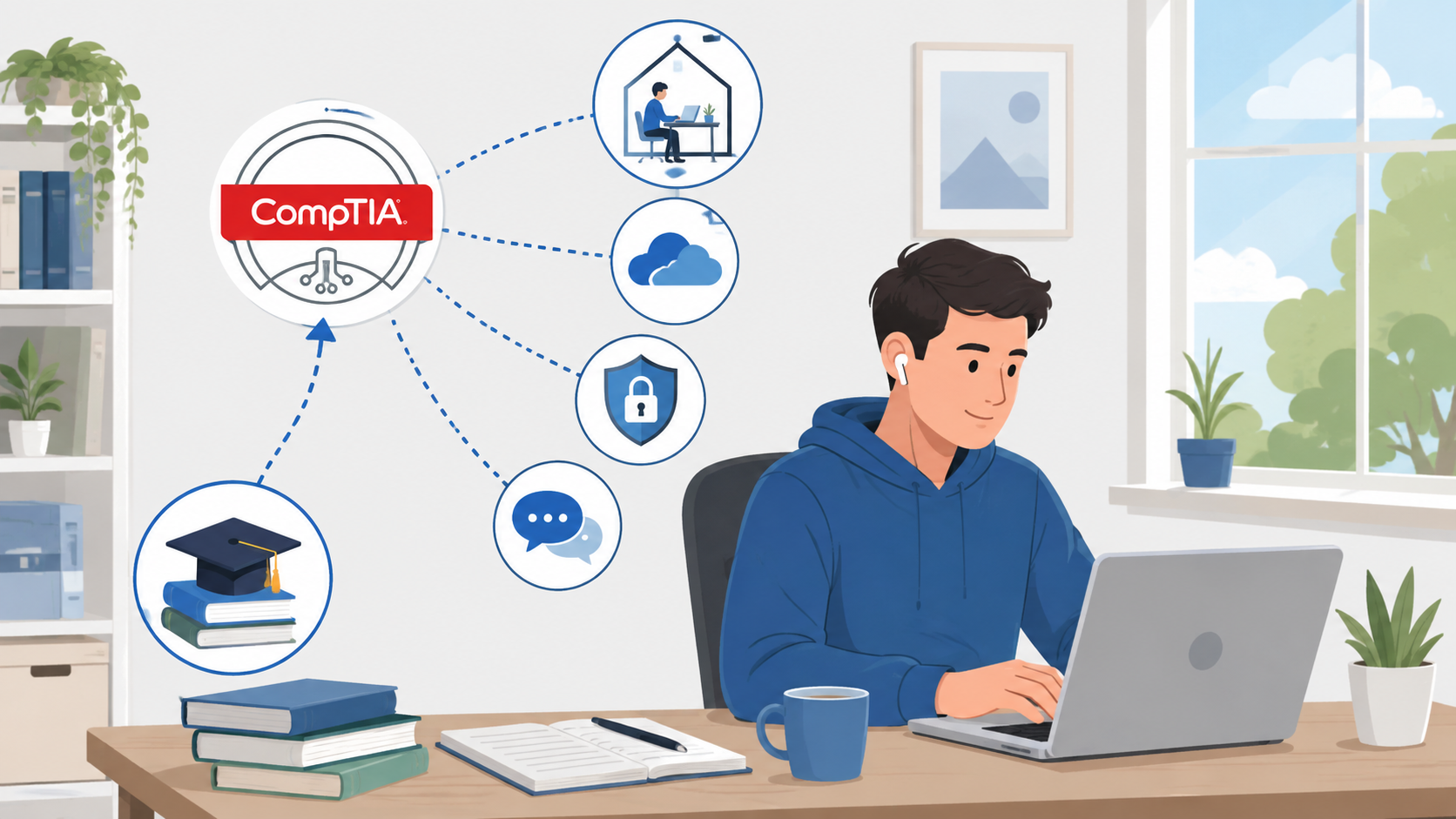
CompTIA certifications can help you build the technical foundation needed for a range of work-from-home IT jobs, including help desk, technical support, networking, systems support, cloud support, and cybersecurity roles.
However, earning a certification does not automatically qualify you for every remote position. Employers may also evaluate your practical troubleshooting ability, communication skills, previous experience, home-lab projects, familiarity with common IT tools, and ability to work independently.
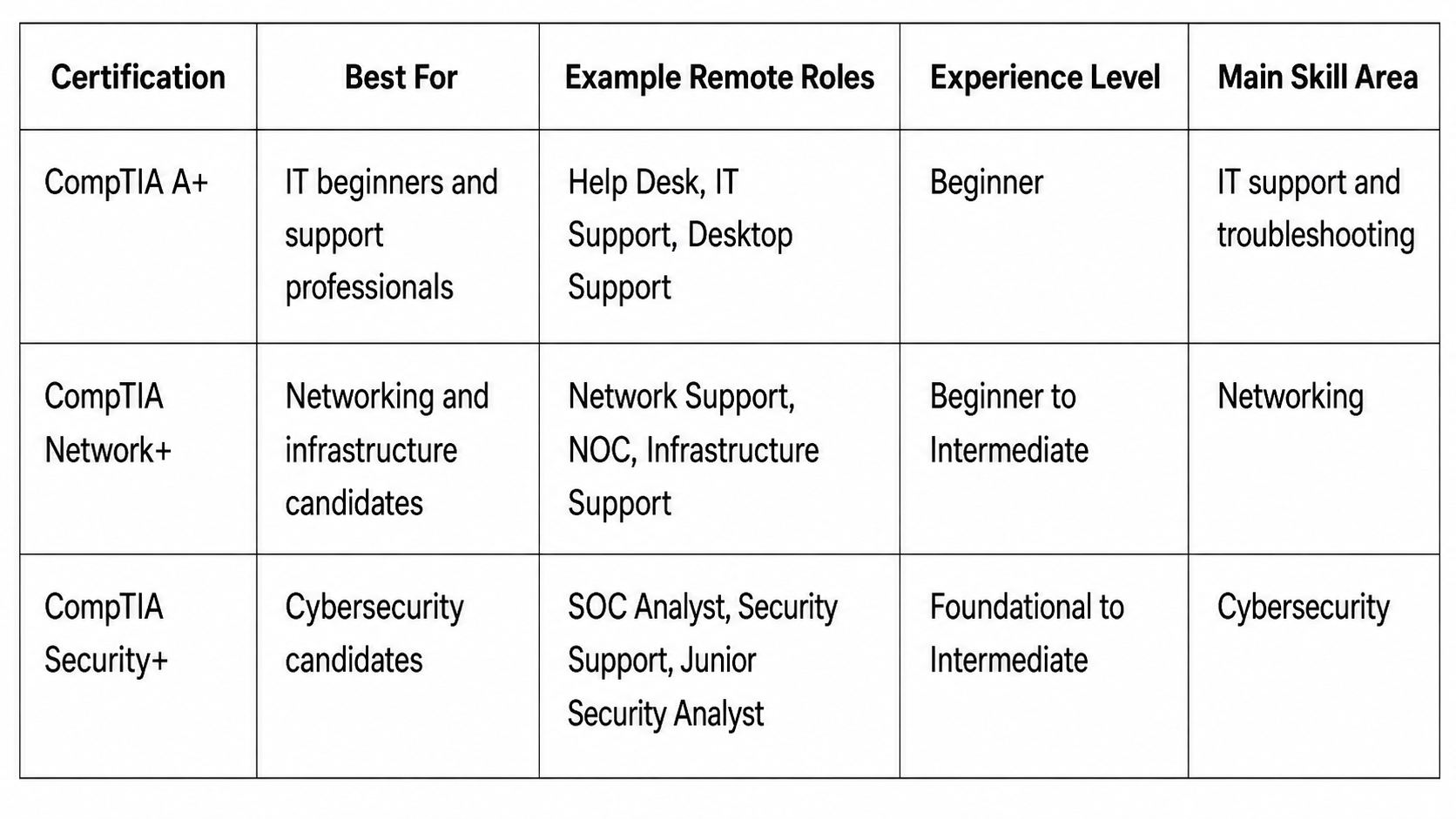
For beginners exploring CompTIA work from home jobs, three certifications are particularly useful starting points: CompTIA A+, CompTIA Network+, and CompTIA Security+. The current A+ certification uses the 220-1201 and 220-1202 exam series, while the current Network+ and Security+ certifications are associated with N10-009 and SY0-701 respectively.
The right certification depends largely on whether you want to work in technical support, networking, cybersecurity, or another IT specialty.
Can You Get a Work-From-Home Job With a CompTIA Certification?
Yes. A CompTIA certification can strengthen your qualifications for remote IT positions, especially when you combine it with practical experience and job-specific skills.
Certifications can help employers see that you understand important technical concepts without requiring them to evaluate your knowledge from scratch.
They may help you:
- Validate foundational technical knowledge
- Meet certification preferences listed in job descriptions
- Demonstrate commitment to entering or progressing in IT
- Build credibility when changing careers
- Structure your technical learning around established objectives
For someone without professional IT experience, certification can be especially useful because it provides evidence that you have invested time in learning the fundamentals.
But certification is only one part of your candidate profile.
Remote employers also need people who can troubleshoot problems without someone standing beside them, document their work clearly, communicate with customers through chat or phone, manage tickets, and know when an issue should be escalated.
A candidate with certification knowledge plus a small home lab and strong communication skills may therefore be more competitive than someone who has simply passed several certification exams without practicing the underlying skills.
Best CompTIA Work-From-Home Jobs in 2026
The following careers are among the most relevant options for people researching remote CompTIA jobs.
Remote Help Desk Technician
A remote help desk technician provides first-line technical assistance to employees or customers.
Typical responsibilities may include:
- Resetting passwords
- Troubleshooting login problems
- Diagnosing operating-system issues
- Resolving basic networking problems
- Supporting printers and peripherals
- Creating and updating support tickets
- Escalating complex incidents
CompTIA A+ is particularly relevant because it develops foundational knowledge across hardware, operating systems, troubleshooting, networking, security, and technical support.
This is one of the more realistic starting points for beginners because many problems can be diagnosed through remote-support software, ticketing platforms, chat, email, or telephone support.
Remote IT Support Specialist
A remote IT support specialist may handle broader technical problems than a traditional first-level help desk position.
You could work with:
- Windows or Linux systems
- User accounts
- Microsoft 365 environments
- Endpoint devices
- Software installations
- VPN connections
- Basic network troubleshooting
- Access permissions
CompTIA A+ is often the most natural starting certification, while Network+ can become useful when the position involves significant network troubleshooting.
Clear customer communication is particularly important because you may need to guide someone through a technical process without physically seeing their computer.
Remote Technical Support Specialist
Technical support positions are sometimes focused on a specific product rather than an organization’s entire IT environment.
For example, a software company might hire remote technical support specialists to help customers troubleshoot its application.
These positions can involve:
- Reproducing software problems
- Reading logs
- Diagnosing configuration issues
- Explaining technical procedures
- Documenting bugs
- Escalating product defects
A+ can provide useful troubleshooting foundations, while networking knowledge becomes important for cloud applications and products that depend heavily on connectivity.
Remote Desktop Support Technician
A remote desktop support technician focuses heavily on end-user devices and operating systems.
Common tasks can include:
- Application troubleshooting
- User-account problems
- Software configuration
- Operating-system errors
- Remote desktop sessions
- Endpoint security
- Device management
CompTIA A+ is closely aligned with this type of foundational support work.
Someone pursuing this path should practice Windows administration, command-line tools, user permissions, basic PowerShell, remote-access tools, and systematic troubleshooting.
Remote Network Support Technician
A remote network support technician investigates connectivity and infrastructure problems.
Knowledge areas may include:
- TCP/IP
- IP addressing
- DNS
- DHCP
- VPNs
- Wireless networking
- Routers
- Switches
- Network troubleshooting
CompTIA Network+ is particularly relevant for this career because it develops vendor-neutral networking knowledge around infrastructure, operations, security, and troubleshooting.
Candidates should supplement certification study with practical networking exercises rather than relying only on theoretical knowledge.
Remote Network Operations Center Technician
A Network Operations Center (NOC) technician helps monitor infrastructure and respond to network events.
Responsibilities may include:
- Monitoring dashboards
- Investigating alerts
- Reviewing device availability
- Identifying connectivity problems
- Opening incidents
- Escalating outages
- Documenting events
Network+ is a useful certification for this type of position because technicians need to understand how networks function before they can effectively investigate failures.
Entry-level NOC roles can also provide experience that eventually supports advancement into network administration, cloud infrastructure, or cybersecurity.
Remote Systems Support or Junior Systems Administrator
Some junior systems-support work can also be performed remotely.
Responsibilities may include:
- Managing user accounts
- Updating permissions
- Troubleshooting operating systems
- Supporting applications
- Working with virtual machines
- Assisting with server administration
- Supporting cloud-based services
A+ provides a useful foundation, while Network+ can strengthen your understanding of how systems communicate.
Candidates pursuing this path should also become comfortable with Windows administration, Linux fundamentals, identity management, virtualization, scripting, and cloud environments.
Remote Cybersecurity Analyst
A remote cybersecurity analyst may help investigate security alerts, identify suspicious activity, review vulnerabilities, document incidents, or support security controls.
CompTIA Security+ provides foundational knowledge across security concepts, threats, architecture, operations, identity, risk, and security management. Current SY0-701 training material continues to emphasize areas including threats, security architecture, security operations, identity, governance, and incident-related concepts.
Security+ can strengthen a candidate’s cybersecurity foundation, but many security analyst positions still expect previous technical experience.
For beginners, experience in help desk, systems administration, or networking can provide valuable preparation.
Remote Security Operations Center Analyst
A Security Operations Center (SOC) analyst monitors security systems and investigates alerts.
Typical responsibilities may involve:
- Reviewing SIEM alerts
- Investigating suspicious events
- Performing initial incident triage
- Examining authentication activity
- Escalating security incidents
- Documenting findings
Security+ is relevant because SOC analysts must understand security threats, access control, network security, incident response, and defensive concepts.
Hands-on practice with logs, security monitoring tools, operating systems, networking, and simulated security incidents can make certification knowledge considerably more useful.
Remote Cloud Support Technician
A remote cloud support technician helps troubleshoot services running in cloud environments.
Tasks can involve:
- User access problems
- Virtual machines
- Connectivity
- DNS
- Permissions
- Applications
- Basic security settings
- Cloud networking
A combination of A+, Network+, and eventually a cloud-specific certification can create a useful foundation.
Cloud support is particularly suitable for remote work because the infrastructure itself is commonly managed through web interfaces, command-line tools, APIs, and remote administration platforms.
Best CompTIA Certifications for Remote IT Jobs
There is no single best certification for every remote career.
Your target job should determine which credential you pursue.
CompTIA A+
CompTIA A+ is usually the strongest starting point for someone with limited professional IT experience.
It covers foundational areas such as:
- Hardware
- Operating systems
- Networking fundamentals
- Software troubleshooting
- Security
- Cloud and virtualization concepts
- Operational procedures
The current A+ certification requires candidates to pass both Core 1 and Core 2 exams in the 220-1201 and 220-1202 series.
Potential CompTIA A+ remote jobs include:
- Help desk technician
- Service desk analyst
- IT support specialist
- Desktop support technician
- Technical support specialist
For complete beginners, A+ can provide a logical introduction before moving into networking or cybersecurity.
CompTIA Network+
CompTIA Network+ focuses more deeply on how networks are built, operated, secured, and troubleshot.
The current N10-009 certification track covers the networking knowledge needed to understand modern network environments.
Potential Network+ remote jobs include:
- Network support technician
- NOC technician
- Infrastructure support technician
- Technical support specialist
- Junior network administrator
Network+ can also be a logical progression after A+ for someone who discovers that networking interests them more than general desktop support.
CompTIA Security+
CompTIA Security+ is focused on foundational cybersecurity knowledge.
It is useful for candidates interested in:
- Security operations
- Identity and access management
- Security monitoring
- Incident response
- Risk and governance
- Infrastructure security
Potential Security+ remote jobs include junior security analyst, SOC analyst, IAM support, and security-support positions.
However, candidates should avoid assuming Security+ automatically makes them competitive for every cybersecurity role.
Security becomes much easier to understand when you already know how operating systems, networks, accounts, applications, and infrastructure normally work.
CompTIA A+ Remote Jobs for Beginners
For most beginners, support-related positions are the most realistic CompTIA A+ remote jobs.
Look for titles including:
- Remote Help Desk Technician
- Remote Service Desk Analyst
- Remote IT Support Specialist
- Remote Desktop Support Technician
- Technical Support Representative
- Remote Technical Support Specialist
These roles depend heavily on troubleshooting and communication.
A support technician might receive a ticket saying that an employee cannot connect to a company VPN. The technician must gather information, check network connectivity, verify credentials, determine whether the VPN client is configured correctly, document troubleshooting steps, and escalate the issue if necessary.
That requires more than memorizing definitions.
Example Beginner Career Path
Imagine a career changer earning A+ while building a small home lab.
They install Windows and Linux virtual machines, practice creating users, troubleshoot network settings, become familiar with command-line tools, and write sample help desk tickets documenting each problem.
After earning A+, they begin applying for help desk, service desk, and technical support roles while continuing to practice.
The certification does not guarantee employment, but it gives the candidate a clearer technical foundation to demonstrate during applications and interviews.
Network+ Remote Jobs and Career Paths
Candidates searching for Network+ remote jobs should look beyond titles containing the word “Network+.”
Relevant positions may include:
- Network Support Technician
- NOC Technician
- Infrastructure Support Specialist
- Technical Support Engineer
- Junior Network Administrator
- Cloud Support Technician
Practical networking skills are especially important.
You should be able to explain and practice concepts such as:
- IP addressing
- Subnetting fundamentals
- DNS
- DHCP
- Routing
- Switching
- VLANs
- VPNs
- Wi-Fi
- Network troubleshooting
Example Network+ Career Path
A support technician might start with A+, spend a year troubleshooting endpoint and connectivity problems, and then earn Network+.
They could build virtual networks, practice subnetting, configure network devices in labs, and begin applying for NOC or network-support positions.
That progression combines certification with increasingly relevant experience.

Security+ Remote Jobs and Cybersecurity Careers
There are many technology security functions that can be performed remotely, but Security+ remote jobs are not necessarily beginner jobs.
Relevant titles can include:
- Junior Security Analyst
- SOC Analyst
- Security Support Specialist
- IAM Support Analyst
- Security Operations Analyst
- Security Compliance Analyst
Security+ provides an important foundation, but cybersecurity professionals are frequently expected to understand networking, operating systems, identity, logging, vulnerabilities, and normal system behavior.
That is why previous support or networking experience can be valuable.
For example, someone who has spent a year troubleshooting Active Directory accounts, VPN connections, Windows systems, and network problems may have more practical context when they later investigate suspicious login activity.
Cybersecurity should be viewed as a career path, not automatically as the first IT job.
Which CompTIA Certification Is Best for Working From Home?
Use your target role to choose the certification.
Choose CompTIA A+ if:
- You are completely new to IT.
- You want help desk or technical support work.
- You need broad foundational knowledge.
- You want to understand computers, operating systems, troubleshooting, and networking basics.
Choose Network+ if:
- You understand basic IT concepts already.
- You enjoy networking.
- You want NOC, network support, or infrastructure roles.
- You want stronger networking knowledge before studying cybersecurity.
Choose Security+ if:
- You want to move toward cybersecurity.
- You already understand basic networking and systems.
- You are targeting SOC, IAM, security support, or analyst roles.
- You want foundational security knowledge.
A common progression for complete beginners is:
A+ → Network+ → Security+
You do not have to follow that exact sequence, but it creates a logical progression from systems and troubleshooting into networking and then security.
Skills Employers Look for in Remote IT Professionals
Technical certification knowledge becomes more valuable when combined with workplace skills.
Troubleshooting Skills
Employers want candidates who can approach problems logically rather than randomly trying solutions.
Learn to identify symptoms, gather information, test likely causes, verify fixes, and document the final resolution.
Written Communication
Remote teams rely heavily on:
- Tickets
- Chat
- Knowledge-base articles
- Incident notes
Your documentation should allow another technician to understand exactly what happened.
Verbal Communication
Support technicians frequently speak to users who do not understand technical terminology.
Being able to explain technical instructions simply is a major advantage.
Ticketing and Documentation
Learn how IT tickets are structured.
Practice writing:
- Problem summaries
- Troubleshooting steps
- Resolutions
- Escalation notes
Remote Support Tools
Become familiar with the concepts behind:
- Remote desktop software
- Screen sharing
- Endpoint management
- VPNs
- Remote administration
Time Management
Remote professionals often work with less direct supervision.
You need to prioritize tickets, meet deadlines, communicate delays, and manage multiple tasks.
Basic Networking
Even desktop problems frequently involve connectivity.
Understanding IP addressing, DNS, DHCP, Wi-Fi, and VPNs can make you much more effective.
Security Awareness
Every IT professional should understand password security, phishing, least privilege, account protection, software updates, and safe handling of sensitive information.
Customer Service Skills
Technical support is still customer service.
Patience, empathy, active listening, and clear explanations are especially valuable in remote environments.
How to Build Hands-On Experience From Home
You do not need an enterprise data center in your bedroom to practice IT.
Start with a simple home lab.
1. Install Virtual Machines
Use virtualization software to create:
- A Windows virtual machine
- A Linux virtual machine
Practice installing, configuring, updating, and troubleshooting them.
2. Practice User Administration
Create different accounts and experiment with:
- Permissions
- Groups
- Password policies
- File access
3. Break Things Intentionally
Disable a network adapter.
Change DNS settings.
Remove an application.
Create a permission problem.
Then troubleshoot the issue systematically.
4. Practice Networking
Create virtual networks and learn to use tools such as:
- ping
- ipconfig
- tracert
- nslookup
- netstat
Learn what each tool tells you.
5. Learn Basic PowerShell and Command-Line Tools
You do not need to become a software developer.
Basic scripting and command-line familiarity can still make routine administration significantly easier.
6. Practice Ticket Documentation
After every lab problem, write a mock ticket containing:
- User-reported problem
- Symptoms
- Troubleshooting performed
- Root cause
- Resolution
7. Use Cybersecurity Labs
If your goal is Security+, practice areas such as:
- Log analysis
- Access control
- Network traffic
- Vulnerability identification
- Incident investigation
8. Build a Small Portfolio
Document selected projects.
For example:
Project: Troubleshooting DNS Failure
Explain the simulated problem, diagnostic commands used, root cause, solution, and what you learned.
That gives you something concrete to discuss during an interview.
How to Find Remote CompTIA Jobs
One of the biggest mistakes candidates make is searching only for “CompTIA jobs.”
Employers usually hire for job functions, not certification names.
Search for titles such as:
- Remote Help Desk Technician
- Remote IT Support Specialist
- Remote Service Desk Analyst
- Remote Network Support Technician
- Remote NOC Technician
- Remote SOC Analyst
- Remote Cybersecurity Analyst
- Remote Technical Support Specialist
Then read each description carefully.
Look for certifications listed under:
- Required qualifications
- Preferred qualifications
- Desired certifications
You may discover that a job requiring certain skills lists A+, Network+, or Security+ as preferred rather than mandatory.
Tailor Your Resume
Do not simply write:
“CompTIA A+ Certified.”
Connect the certification to relevant skills and projects.
For example, include experience with:
- Windows troubleshooting
- Linux
- TCP/IP
- DNS
- DHCP
- Virtual machines
- PowerShell
- Ticket documentation
- Home-lab projects
- Customer service
Previous non-IT customer-service experience can also be valuable for help desk positions because communication is a major part of the role.
Are Work-From-Home IT Jobs Good for Beginners?
They can be, but remote positions have advantages and disadvantages.
Potential advantages include:
- Access to employers outside your immediate area
- No daily commute
- Greater geographic flexibility
- Opportunities in help desk and technical support
However, beginners may also encounter:
- Strong competition
- Employers requesting previous experience
- Technical interviews
- Significant communication expectations
- Greater need for self-management
- Entry-level positions that are hybrid rather than fully remote
Do not automatically reject a good hybrid opportunity simply because your long-term objective is remote work.
Six or twelve months of strong hands-on experience can significantly expand the range of positions you are able to target later.
Step-by-Step Path to a Remote IT Career With CompTIA
1. Choose a Target Career
Decide whether you are most interested in support, networking, cloud, systems, or cybersecurity.
2. Select the Relevant Certification
Use A+ for broad entry-level IT support, Network+ for networking, and Security+ for cybersecurity foundations.
3. Study the Exam Objectives
Structure your learning around the technologies and concepts tested by your chosen certification.
4. Build Practical Skills
Practice what you are studying instead of only watching videos or reading books.
5. Use Realistic Practice Exams
Practice questions can help you identify weak areas, become familiar with question structure, and determine which objectives need additional study.
6. Earn the Certification
Passing the exam provides formal evidence of your certification knowledge.
7. Build Demonstrable Projects
Create several small projects you can explain confidently during interviews.
8. Create an IT-Focused Resume
Highlight certifications, technical skills, projects, troubleshooting experience, and transferable customer-service skills.
9. Apply for Remote and Hybrid Roles
Do not restrict yourself unnecessarily when a hybrid position could provide valuable early-career experience.
10. Keep Building Skills
Your first certification should be the beginning of your development, not the end.
Common Mistakes When Looking for Remote CompTIA Jobs
Assuming Certification Guarantees Employment
Certification can strengthen your profile, but employers evaluate the complete candidate.
Correction: Combine certification with labs, projects, communication skills, and targeted applications.
Searching Only for Jobs Containing “CompTIA”
Most job titles do not include certification names.
Correction: Search by role instead.
Ignoring Hands-On Skills
Knowing the correct definition is different from troubleshooting a real problem.
Correction: Practice each major technical concept whenever possible.
Applying Only for Cybersecurity Positions
Someone with no previous IT experience may face significant competition for security roles.
Correction: Consider support, networking, or systems positions that can provide relevant experience.
Sending the Same Resume Everywhere
Different jobs emphasize different technologies.
Correction: Adjust your skills and project sections to match each position.
Ignoring Customer-Service Experience
Communication matters enormously in remote support.
Correction: Highlight transferable experience involving customers, troubleshooting, communication, documentation, or problem solving.
Rejecting Every Hybrid Position
A hybrid role can provide valuable experience that makes future remote applications stronger.
Correction: Evaluate each opportunity based on the skills and experience you would gain.
Collecting Certifications Without Practicing
Five certifications do not automatically make someone more employable than a candidate with two certifications and meaningful practical ability.
Correction: Build projects alongside every certification.
Frequently Asked Questions About CompTIA Work-From-Home Jobs
Can I work from home with CompTIA A+?
Yes. A+ can support applications for remote help desk, IT support, service desk, desktop support, and technical support positions. Employers may still require practical skills or previous experience.
What remote jobs can I get with CompTIA A+?
Relevant roles include remote help desk technician, IT support specialist, service desk analyst, desktop support technician, and technical support specialist.
Can CompTIA Network+ help me get a remote job?
Yes. Network+ can strengthen your qualifications for positions involving network support, NOC operations, infrastructure support, technical support, and junior network administration.
What work-from-home jobs can I get with Security+?
Security+ may support applications for SOC analyst, junior security analyst, IAM support, security operations, and security-support positions. Some employers will expect additional IT experience.
Which CompTIA certification is best for remote jobs?
For beginners, A+ is usually the most practical starting point. Choose Network+ for networking careers and Security+ for cybersecurity-focused paths.
Can I get a remote IT job with no experience?
It is possible, particularly in support roles, but competition can be significant. Certification, home labs, projects, customer-service experience, and strong communication can improve your profile.
Is CompTIA A+ enough to get an IT job?
A+ can help qualify you for entry-level opportunities, but it does not guarantee employment. Employers may also assess hands-on skills, communication, projects, and previous experience.
Are cybersecurity jobs commonly remote?
Many security tasks can technically be performed remotely, particularly monitoring, analysis, IAM, compliance, and incident-related work. Whether a specific job is remote depends on the employer and security requirements.
Do remote IT jobs pay well?
Compensation varies significantly depending on location, employer, experience, specialization, responsibilities, and employment type. Cybersecurity and advanced infrastructure positions generally require more specialized experience than entry-level support jobs.
Should I apply for hybrid IT jobs too?
Yes, particularly when you are trying to get your first IT position. A good hybrid role can provide practical experience that helps you compete for fully remote opportunities later.
Final Thoughts: Turning a CompTIA Certification Into a Remote IT Career
There are realistic CompTIA work from home jobs across IT support, networking, infrastructure, cloud support, and cybersecurity.
For beginners, CompTIA A+ can provide a strong starting point for help desk and technical support. Network+ can help you progress toward networking and infrastructure roles, while Security+ can strengthen your cybersecurity foundation.
The most important strategy is not simply collecting certifications.
Combine your certification with:
- Practical labs
- Technical projects
- Troubleshooting experience
- Strong communication
- Good documentation
- A focused resume
- Consistent job applications
If you are preparing for A+, Network+, Security+, or another CompTIA certification, realistic practice questions can also help you identify knowledge gaps and test whether you can apply what you have studied.
Use certification as the foundation, build practical skills around it, and target job titles that match the work you are actually prepared to perform.
That approach gives you a far more realistic path toward turning certification knowledge into a long-term remote IT career.