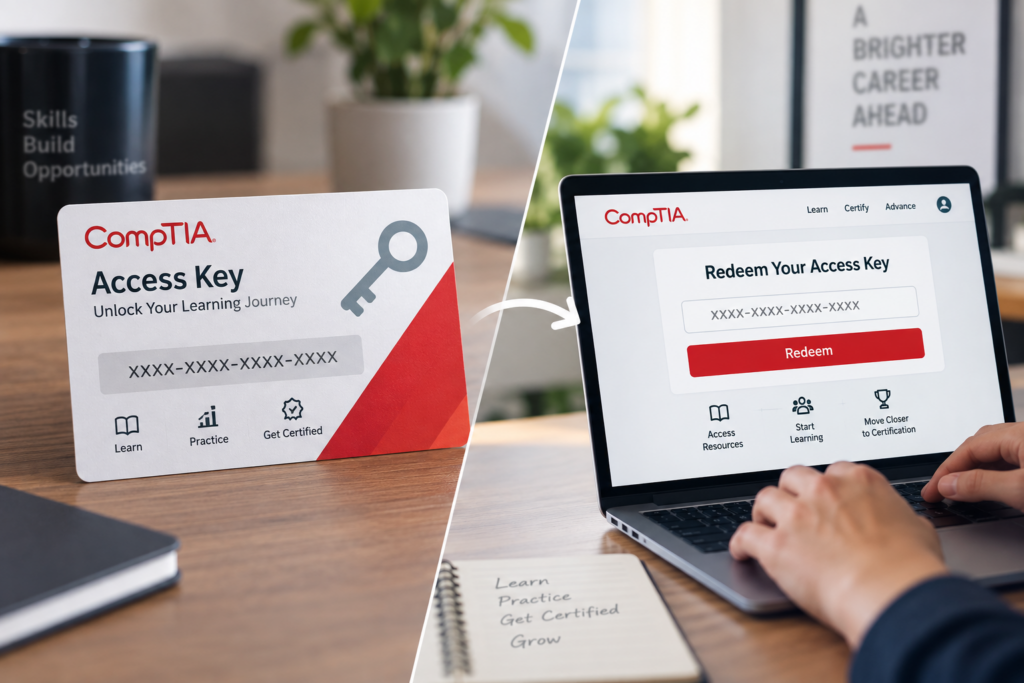
CompTIA Access Key: What It Is and How to Redeem It
A CompTIA access key is a code used to activate a specific learning product, such as an online course or digital study resource. To redeem it, follow the instructions supplied with that product. The correct account, registration page, and activation steps depend on what you purchased or received.
Start by identifying what your code provides—not by trying it on every CompTIA sign-in page. This guide explains the distinctions, how to follow the appropriate activation route, and what to check when your learning materials do not appear.
What Is a CompTIA Access Key?
What Your Access Key Is Used For
Think of an access key as a way to claim the learning resource associated with your purchase or enrollment. It is not your password, and you should not assume it provides access to every resource carrying the CompTIA name.
CompTIA’s training services include products identified as CertMaster Learn, CertMaster Practice, CertMaster Labs, and eBooks. Check the complete product description rather than relying on the certification name alone.
For example, when checking a CompTIA Security+ order, establish whether the item is learning content, practice material, a lab product, or an exam voucher before attempting activation.
Access Key vs. Exam Voucher vs. Account Login
These items serve different purposes:
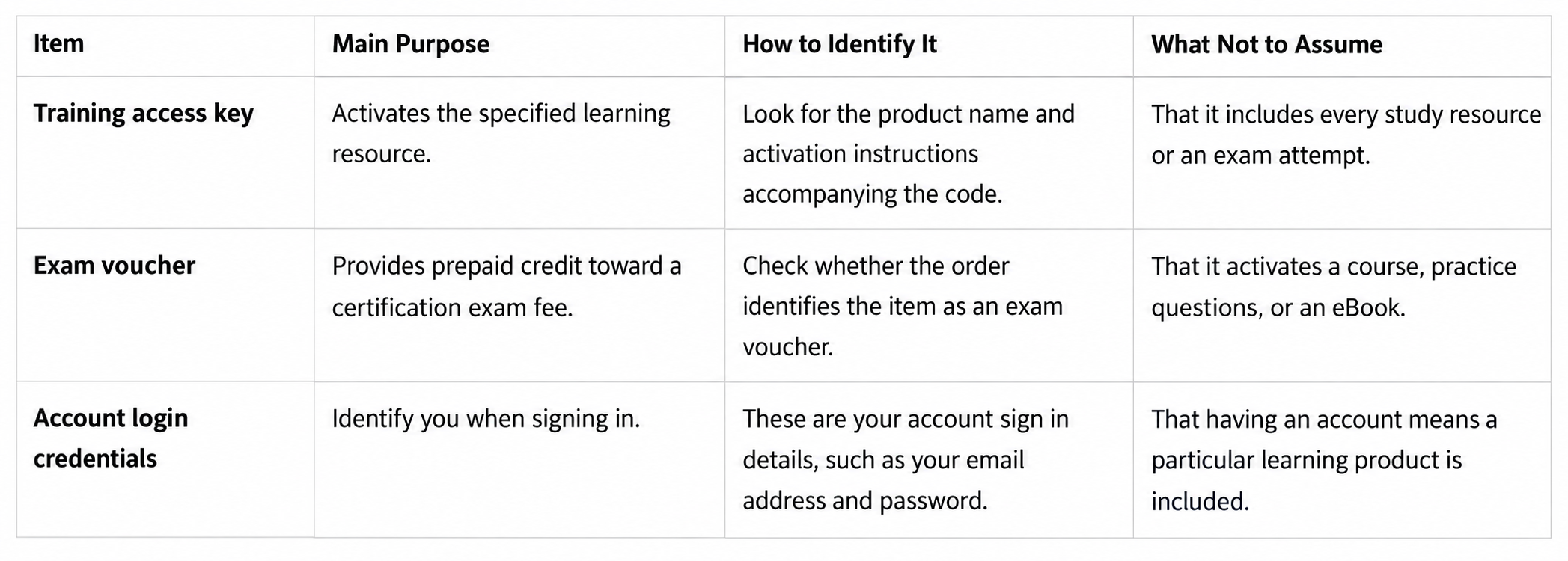
CompTIA Help describes exam vouchers as prepaid credits toward certification exam fees. The Learning Center separately requests account credentials for access to its learning environment.
Illustrative example—exam payment rather than training: You receive a code labeled “exam voucher” and look for somewhere to activate study materials. Check the order contents first: an exam-payment code is not evidence that learning access was also purchased. Look for a separately listed training item.
What to Check Before Redeeming Your CompTIA Access Key
Find Your Purchase or Enrollment Instructions
Begin with the information associated with the purchase. Check your order details, the email delivering the product, and any accompanying setup instructions. Search your inbox using the seller’s name, the product title, or your order reference.
Do not assume that a payment receipt contains everything needed for activation. Look specifically for instructions explaining what was supplied and where to access it.
For school- or employer-funded training, ask the person managing enrollment for the original access instructions. They should confirm what you were assigned and whether you should expect a personal code.
Illustrative example—identifying training access: A learner receives a code with digital course materials. Before entering it anywhere, they check the accompanying instructions and discover that the resource uses CompTIA Learning Center registration. They follow that route rather than assuming the code belongs on an exam-booking screen.
Confirm the Product and Account You Should Use
Write down the full product name and relevant exam version. Then identify the platform named in the delivery instructions.
Confirm which account should hold the learning access. This is particularly important when you use both a personal email address and a school or work address.
Have these details ready:
- Product information: The full title, exam version, and purchase or enrollment reference.
- Account information: The intended learner’s email address and access to that account.
- Activation instructions: The supplied destination, the code if applicable, and any stated deadlines.
Do not create a second account simply because a product is missing. Resolve uncertainty about the intended account with the seller or training administrator first.
How to Redeem a CompTIA Access Key
Step 1: Identify the Correct Redemption Instructions
Match the instructions to the specific product in your order. A guide for a different resource is not a reliable substitute merely because both products are CompTIA-branded.
Documented delivery routes include redemption through a CompTIA account and registration through the CompTIA Learning Center. They do not necessarily place account sign-in and key entry in the same order. Use the route identified in your fulfillment information.
When instructions are missing or contradictory, ask the supplier to confirm the correct route before submitting the code.
Step 2: Sign In Through the Specified Platform
For instructions directing you to your CompTIA account, use the supplied account destination. CompTIA Help also includes a My Training Products entry in its navigation.
For instructions specifying the Learning Center, use that product’s supplied destination. Its sign-in page identifies the CompTIA Learning Center, CertMaster Learn, and CertMaster CE and requests an email address and password. This does not establish one activation process for every CertMaster product.
Use your existing account when the applicable instructions call for it. When registration begins with key entry instead, follow that sequence rather than signing into an unrelated portal first.
Step 3: Enter the Key and Follow the Product-Specific Steps
The sequences below are conditional route guides, not a verified current screen-by-screen procedure for every product. Use them only when they match your delivery instructions; consult those instructions for the exact controls.
Route A: Your instructions specify CompTIA account redemption
- Open the access-key redemption destination supplied with the product.
- Sign in to the intended CompTIA account, checking the account email before continuing.
- Enter the associated access key and use the redemption action identified in your instructions.
- Follow the resulting direction to open the activated training or review your available products.
This account-first sequence is documented in Embold’s instructions for the CompTIA products it supplies. It should not be applied automatically to unrelated purchases.
Route B: Your instructions specify Learning Center registration
- Open the Learning Center registration destination supplied with the courseware.
- Enter the access key when the registration instructions request it.
- Use the existing-account sign-in option when applicable. Register only when you do not have the relevant account and the instructions require registration.
- Complete the stated process and open the associated learning resource.
Fast Lane’s CompTIA eBook instructions document this key-first sequence. Confirm that your own delivery information specifies the same route before using it.
When copying a key, avoid including surrounding text or accidental spaces. Preserve the characters as supplied unless your instructions explicitly specify a formatting change.
Step 4: Confirm That Your Learning Materials Are Available
Open the activated resource rather than stopping at a confirmation screen. Compare its title and exam version with your order.
The account-based instructions above direct learners to their activated training or product list. Learning Center courseware instructions instead direct learners back through the Learning Center login for subsequent access.
If activation appears successful but the expected resource is absent, record what happened. Recheck the account email, return through the supplied product destination, and contact the appropriate support team if the mismatch remains. Do not assume another purchase is necessary.
What to Know About a CertMaster Access Key
Identify Your Specific CertMaster Product
“CertMaster access key” is not a sufficiently precise description for choosing an activation procedure. Start with the complete product name on the order or enrollment information.
CompTIA’s status information distinguishes learning components including Learn/CE, Labs, Practice, and eBooks. That distinction is a reason to check your particular resource—not to treat those names as interchangeable.
Record the certification, product name, and version together. Also check whether the supplied item is an individual resource or part of a package. Do not infer package contents from a broad heading such as “training.”
Check Instructions for School- or Employer-Provided Access
Ask your training administrator to confirm the enrollment method. Specifically, establish whether you should receive an individual key, follow an invitation, or use an account where the institution has arranged access.
Also confirm the intended email address and whether any course-specific registration information is required.
Do not assume institutional enrollment follows the retail-purchase process. If no personal key was supplied, ask whether one is actually required before reporting it as missing.
What to Do If Your CompTIA Access Key Does Not Work
An error message alone does not establish that a key is defective. Start with the product, account, and instructions, then preserve the exact message for support.
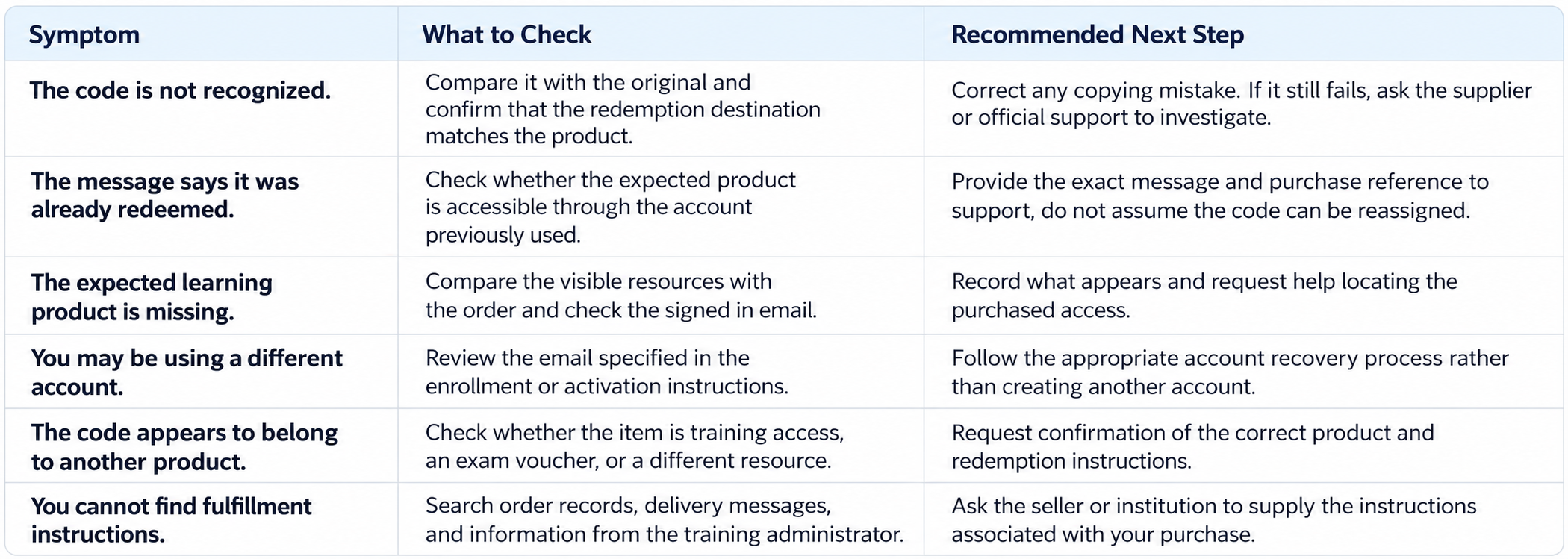
Before contacting support, gather the full product name, order reference, account email, exact error wording, and a short description of the attempted steps.
For missing enrollment information, start with the institution or seller. For an unresolved CompTIA account or product issue, CompTIA Help provides a Submit a Help Request option and recommends signing in before submitting a request.
Do not post full access keys, passwords, or unredacted account screenshots publicly. Share sensitive purchase information only through the appropriate secure support process, and never provide your password.
After Activation: Start Your Exam Preparation
Once you can open the correct materials, turn access into a study routine. Begin with the exam objectives for your intended exam version and organize your study sessions around those topics.
After studying a section, try suitable practice questions and review the reasoning behind your answers. Use mistakes to decide what needs another explanation, additional reading, or practical work.
Globalcerts offers supplemental certification preparation; it is separate from the service responsible for activating your third-party learning product.
Explore Globalcerts CompTIA practice exams to support your study plan.
Frequently Asked Questions
Where can I find my CompTIA access key?
Check the product-delivery instructions, order information, and messages associated with your purchase. For funded training, ask your school, employer, or provider which enrollment method applies. Do not assume that every arrangement includes a personal key or that the payment receipt is the complete activation guide.
Is a CompTIA access key the same as an exam voucher?
No. A training access key is associated with learning access, while an exam voucher provides prepaid credit toward a certification exam fee. Check the order contents separately: possession of a voucher does not establish that a course or other training resource was included.
Where do I redeem a CertMaster access key?
Use the destination specified for your exact product. Do not choose a portal solely because its sign-in page mentions CertMaster. The Learning Center sign-in page, for example, lists Learn and CE, but that does not confirm where every CertMaster key should be entered.
Do I need an access key if my school or employer provided the training?
Ask the administrator responsible for your enrollment. Confirm whether you need a personal code, an invitation, or another documented access method, and which email address to use. Missing a key is not enough to conclude that your training has not been supplied.
Can I use a CompTIA access key more than once?
Separate redeeming a key from returning to your learning materials. For ongoing study, use the login route associated with the activated product. Do not assume that the same code can activate another learner, account, or copy of the resource; check the particular license terms.
Does a CompTIA access key expire?
Check the terms supplied with the exact product. Keep three questions separate: the deadline to redeem the code, the learning-access period after activation, and any exam voucher’s validity. Do not apply one date to all three. Ask the supplier for clarification when the relevant deadline is unclear.
What should I do if my key says it has already been redeemed?
First check whether the expected learning product is accessible through the account you previously used. If it is not, contact the supplier or official support with your purchase reference, account email, and exact error message. Do not create another account or buy another key as your first response.
The essential next step is to identify the product, follow its supplied redemption instructions, and confirm that the expected learning access is available. When something does not match, seek clarification with the purchase details in hand rather than guessing at a different activation route.