Best Computer Hardware Certifications in 2026: Is CompTIA A+ Worth It?
If you want to start a career repairing computers, supporting users, troubleshooting devices, or working with IT infrastructure, choosing the right certification can be confusing. Search for computer hardware certifications, and you will find credentials covering everything from desktop PCs and laptops to servers, network devices, and vendor-specific equipment.
For many beginners, CompTIA A+ remains one of the strongest starting points in 2026. It covers computer hardware in depth, but it also goes beyond hardware into operating systems, networking, security, troubleshooting, mobile devices, cloud concepts, and professional IT support practices. The current A+ certification requires the 220-1201 Core 1 and 220-1202 Core 2 exams.
So, is CompTIA A+ worth it in 2026? For someone entering IT support, desktop support, computer repair, or a similar entry-level technical role, usually yes. For someone already experienced in IT or targeting a specialized server, networking, or vendor-specific hardware role, another certification may make more sense.
This guide compares the best hardware certifications available in 2026 and explains how to choose the right path for your career.
What Are Computer Hardware Certifications?
Computer hardware certifications validate knowledge and skills related to installing, configuring, maintaining, supporting, or troubleshooting physical IT equipment.
Depending on the certification, this may include:
- CPUs and processors
- Motherboards
- RAM
- HDDs and SSDs
- Power supplies
- Displays
- Laptops
- Mobile devices
- Printers
- Peripheral devices
- Cables and connectors
- Network equipment
- Server hardware
- Hardware installation and upgrades
- Device configuration
- Preventive maintenance
- Hardware troubleshooting
Not every IT hardware certification focuses exclusively on physical components. Modern technicians rarely work with hardware in isolation. A computer that cannot access the network, for example, may have a faulty network adapter, an incorrect IP configuration, a driver problem, or a router issue.
That is why certifications such as CompTIA A+ combine hardware knowledge with software, operating systems, networking, security, and troubleshooting. CompTIA’s current A+ program specifically covers hardware alongside operating systems, networking, security, mobile devices, virtualization, cloud computing, troubleshooting, and operational procedures.
Who Should Consider a Hardware Certification?
A hardware-related certification can be useful for:
- Complete IT beginners
- Aspiring computer technicians
- Computer repair technicians
- Help desk technicians
- Desktop support technicians
- Field service technicians
- IT support specialists
- Students
- Career changers
- Junior infrastructure professionals
The right certification depends on the equipment you want to support.
Someone troubleshooting employee laptops has different needs from a technician replacing Cisco equipment at customer locations. Likewise, someone maintaining servers in a data center needs deeper infrastructure knowledge than someone working at a general help desk.
Do You Need a Certification to Work With Computer Hardware?
Not necessarily.
You can learn computer hardware through labs, personal projects, technical education, apprenticeships, or work experience. Some employers care more about what you can troubleshoot than which certification appears on your resume.
However, a hardware certification can give beginners a structured learning path and a recognizable way to demonstrate foundational knowledge when they do not yet have much professional experience.
Certification works best when paired with hands-on skills.
For example, knowing that an SSD is faster than a traditional hard drive is useful. Actually installing an SSD, configuring the system, troubleshooting a missing drive, and explaining the change to a user demonstrates practical ability.
Best Computer Hardware Certifications in 2026
There is no single certification that is best for every hardware career. These are five of the most relevant options to consider in 2026.
1. CompTIA A+ — Best Overall for Entry-Level IT Support
CompTIA A+ is the most balanced choice for many people starting an IT support or computer technician career.
The current certification uses two exams: 220-1201 Core 1 and 220-1202 Core 2. Core 1 covers areas including mobile devices, networking technology, hardware, virtualization, cloud computing, and troubleshooting. Core 2 expands into operating systems, security, software troubleshooting, and operational procedures.
Best for: Beginners, help desk candidates, desktop support technicians, computer technicians, and career changers.
Level: Entry level.
Type: Vendor-neutral.
Biggest advantage: It gives you a broad foundation instead of teaching hardware in isolation.
Biggest limitation: If you already have substantial IT support experience, much of the material may be familiar.
A+ is particularly useful when you are not yet sure whether you eventually want to specialize in networking, cybersecurity, systems administration, cloud, or another IT field.
2. Cisco Certified Support Technician IT Support — Strong A+ Alternative for Beginners
The Cisco Certified Support Technician (CCST) IT Support certification is another entry-level option worth considering.
Despite the Cisco name, the certification is not limited to configuring routers and switches. The current 100-140 CCST IT Support exam covers IT support tasks including documentation, troubleshooting, helping end users, managing computer components, queue and time management, and identifying security threats. Cisco positions it for roles such as IT end-user support, help desk support, and computer support specialist.
Best for: Beginners specifically interested in IT support and end-user troubleshooting.
Level: Entry level.
Type: Cisco certification with broad IT support content.
Biggest advantage: Strong alignment with entry-level support work.
Biggest limitation: A+ currently provides broader coverage across the traditional foundational IT support landscape.
Choose CCST IT Support when its curriculum and Cisco learning pathway align particularly well with your goals.
3. CompTIA Server+ — Best for Server Hardware and Data Centers
If you want to move beyond desktops and laptops into servers, CompTIA Server+ is more specialized.
Server+ focuses on securely installing, deploying, managing, and troubleshooting servers. Its curriculum covers server hardware and storage, server administration, security, disaster recovery, troubleshooting, virtualization, and environments that may be on-premises, in data centers, or hybrid. CompTIA recommends A+ knowledge or equivalent experience plus hands-on server experience before attempting it.
Best for: Junior system administrators, server technicians, data center technicians, and infrastructure professionals.
Level: Early-career/intermediate relative to A+.
Type: Vendor-neutral.
Biggest advantage: Much deeper server and infrastructure focus than A+.
Biggest limitation: It is not the logical first certification for most complete beginners.
If your goal is replacing server components, managing storage, supporting server operating environments, or working inside data centers, Server+ is more relevant than a general computer technician certification.
4. Cisco Certified Field Technician — Best for Cisco Hardware Field Service
The Cisco Certified Field Technician (CCT) is one of the most directly hardware-oriented certifications on this list.
Cisco’s current 800-150 FLDTEC exam covers on-site replacement of Cisco technologies across routing, switching, data center, Unified Computing System (UCS), and collaboration platforms. Skills include hardware identification, cabling, configuration backup and restoration, and software upgrades and downgrades.
Cisco describes CCT Field Technicians as professionals who diagnose, restore, repair, and replace Cisco networking and system devices at customer sites.
Best for: Field technicians supporting Cisco environments.
Level: Entry-level/vendor-specialized.
Type: Vendor-specific.
Biggest advantage: Closely aligned with real field hardware replacement responsibilities.
Biggest limitation: Its focus is much narrower than CompTIA A+ because it centers on Cisco technology.
If your employer or target job works heavily with Cisco equipment, this specialization can be an advantage. If you simply want your first general IT support job, A+ is normally broader.
5. CompTIA Network+ — Best for Network Hardware and Infrastructure
CompTIA Network+ is not a computer repair certification, but it becomes relevant when your interest shifts from individual PCs toward network infrastructure.
The current N10-009 certification covers networking concepts, network implementations, operations, security, and troubleshooting. That includes physical installations, wired and wireless connectivity, switching technologies, network appliances, and tools used to diagnose connectivity problems.
Best for: Network support technicians, junior network administrators, systems technicians, and infrastructure professionals.
Level: Early career.
Type: Vendor-neutral.
Biggest advantage: Builds infrastructure knowledge that applies across multiple vendors.
Biggest limitation: PC repair and desktop hardware are not its primary purpose.
Someone who enjoys working with switches, access points, network cabling, connectivity, and infrastructure may find Network+ more valuable after gaining basic IT knowledge.
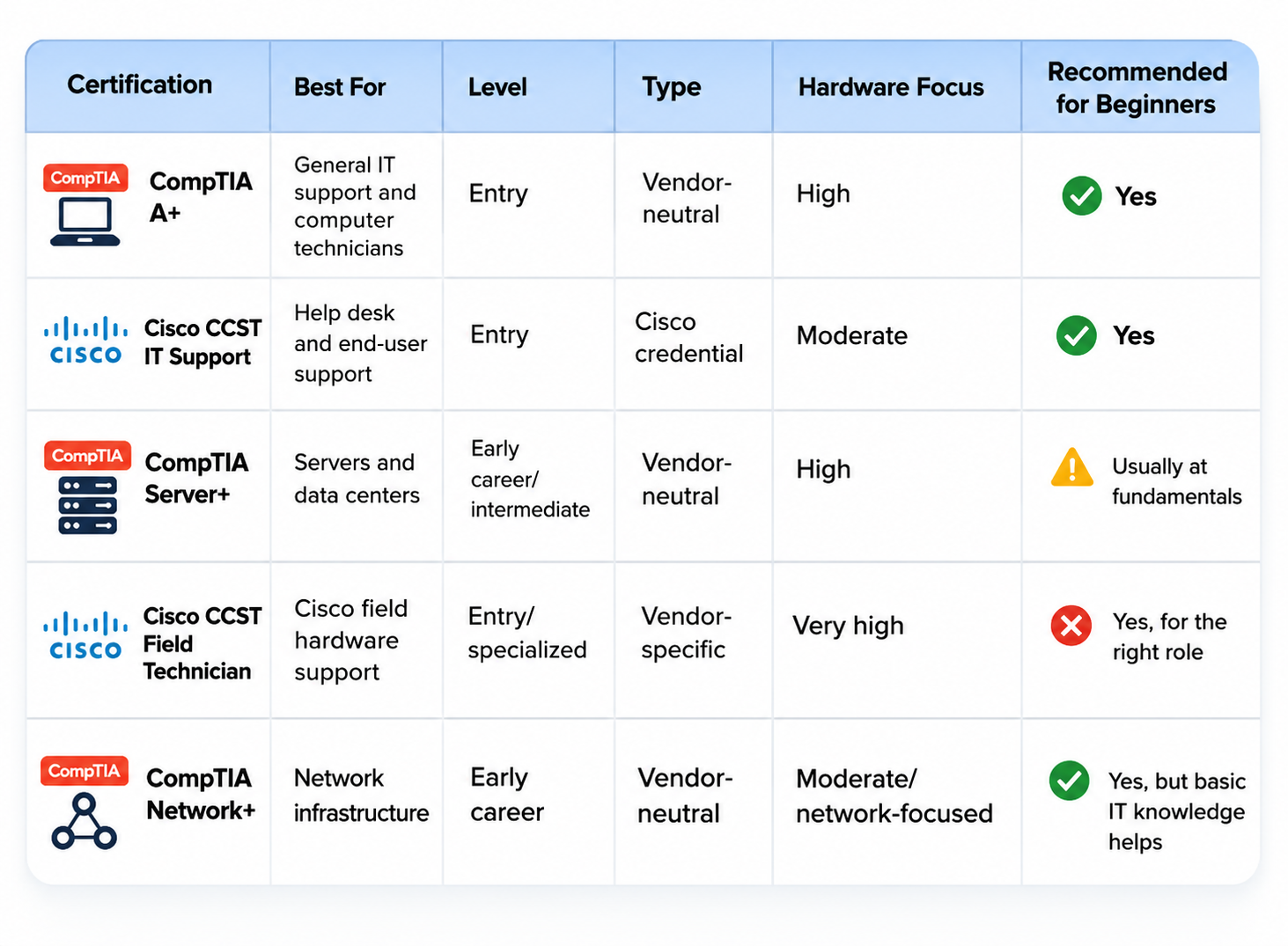
Computer Hardware Certifications Comparison
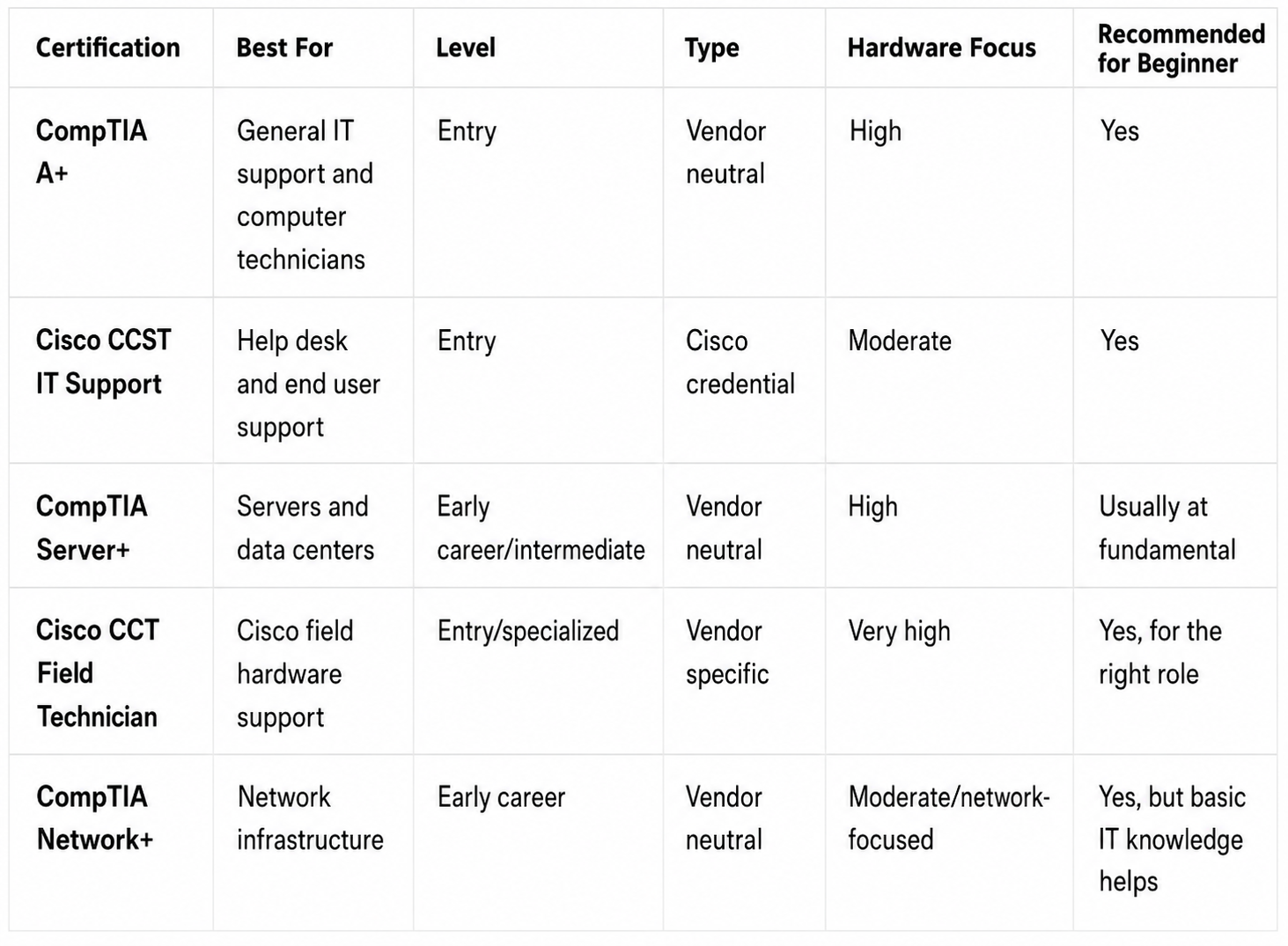
The key takeaway is simple: CompTIA A+ provides the broadest starting point for general IT support, while Server+, CCT, and Network+ become more attractive when you already know which area of infrastructure you want to pursue.
Is CompTIA A+ a Hardware Certification?
Yes—but calling it only a hardware certification does not tell the full story.
CompTIA A+ contains substantial hardware material. The current Core 1 exam explicitly includes hardware as well as mobile devices and hardware/network troubleshooting. However, A+ also tests networking, virtualization and cloud concepts, operating systems, security, software troubleshooting, and operational procedures.
So if you see A+ described as a CompTIA hardware certification, understand that it is better classified as a foundational IT support certification with strong hardware coverage.
That broader scope is valuable because real support problems often cross technical boundaries.
A user saying “my computer doesn’t work” may actually have:
- Faulty RAM
- A failed SSD
- A damaged power supply
- An operating system problem
- A network configuration error
- Malware
- A driver problem
- A damaged cable
- Incorrect peripheral configuration
A technician needs to identify which layer is actually causing the problem.
What Hardware Skills Does CompTIA A+ Cover?
CompTIA A+ introduces candidates to many of the technologies found in everyday IT support environments.
Hardware-related subjects in the current certification include areas such as:
- Desktop computer components
- Laptop hardware
- Memory
- Storage
- Cables and connectors
- Displays
- Peripheral devices
- Printers
- Networking equipment
- Mobile device components
- Hardware installation
- Component replacement
- Device configuration
- Hardware troubleshooting
Current Core 1 objectives place dedicated emphasis on hardware and hardware/network troubleshooting, in addition to mobile devices and networking.
More importantly, the certification expects you to understand how components interact rather than simply memorize their names.
Example CompTIA A+ Hardware Troubleshooting Scenario
Imagine a desktop computer powers on, but the operating system does not load.
A beginner might immediately assume Windows needs to be reinstalled.
A technician takes a more systematic approach.
First, confirm what the machine is actually doing. Does the BIOS or UEFI detect the storage drive? Are there unusual sounds? Was hardware recently changed? Can the system see the boot device? Are cables secure? Does another diagnostic indicate drive failure?
If the SSD is not detected, reinstalling the operating system is not the first logical action. The problem may involve the drive, its connection, a configuration issue, or another hardware failure.
This type of structured troubleshooting mindset is one of the practical benefits of studying A+.
Is CompTIA A+ Worth It in 2026?
For many beginners, CompTIA A+ is still worth earning in 2026.
One reason is breadth. The current certification prepares candidates to work with multiple devices and operating systems while covering the hardware, networking, security, software, and troubleshooting knowledge expected in modern IT support environments.
Why A+ Can Be Worth It
It provides structure. Instead of randomly watching videos about CPUs, Windows, routers, malware, and printers, you follow defined objectives.
It is beginner-oriented. You do not need another certification before pursuing A+. CompTIA recommends practical experience, but there is no formal certification prerequisite.
It teaches more than hardware. That matters because most entry-level support jobs involve combinations of hardware, software, accounts, operating systems, networking, security, and users.
It supports specialization later. Once you understand general IT support, you can make a better-informed choice about networking, systems administration, cybersecurity, cloud, or other areas.
It can help career changers demonstrate technical learning. If your previous work experience is outside IT, a recognized certification can provide another piece of evidence that you have built relevant technical knowledge.
Limitations of CompTIA A+
A+ also has limitations.
First, a certification does not guarantee employment. Employers may also look for communication skills, hands-on ability, troubleshooting experience, education, internships, or previous work experience.
Second, passing an exam is not the same as repairing real computers. You should practice whenever possible.
Third, experienced technicians may not receive enough additional value from an entry-level certification to justify starting with A+.
Finally, A+ may be broader than necessary for someone with a clearly specialized goal.
If you already know that you want to replace Cisco infrastructure equipment in the field, CCT may be more directly relevant. If you already support enterprise servers, Server+ may fit your role better.
Who Should Get CompTIA A+?
A+ makes particular sense if:
- You have little or no professional IT experience.
- You want to become an IT support technician.
- You want a computer technician certification.
- You are moving into IT from another career.
- You want desktop or help desk work.
- You enjoy troubleshooting PCs and laptops.
- You want broad fundamentals before specializing.
- Job postings you are targeting repeatedly mention A+.
Who May Not Need CompTIA A+?
Skipping A+ may be reasonable if:
- You already have significant professional IT support experience.
- You already hold more advanced relevant certifications.
- Your employer expects a specific vendor credential.
- Your target role is narrowly focused on networking, servers, cloud, or another specialty.
- You can already demonstrate equivalent knowledge and hands-on experience.
The decision should be based on the role you want—not on collecting certifications for their own sake.
What Jobs Can You Get With a Computer Hardware Certification?
Hardware and IT support knowledge can be relevant to roles such as:
- IT Support Specialist
- Help Desk Technician
- Desktop Support Technician
- Computer Technician
- PC Repair Technician
- Field Service Technician
- Technical Support Specialist
- Junior IT Technician
- Computer Support Specialist
- Data Center Technician
- Network Support Technician
The certification that makes the most sense changes by role.
A desktop support position may align well with A+. A Cisco field service position may favor CCT. Server and data center work may benefit more from Server+ knowledge.
Employer requirements vary, so always compare a certification’s objectives with actual job descriptions in the type of work you want.
Computer Hardware Certification vs Computer Science Degree
A computer hardware certification and a computer science degree serve different purposes.
A certification is usually narrower and focuses on particular technical or job-related skills. A degree generally provides a much broader education covering areas such as programming, algorithms, data structures, mathematics, computing theory, and software development.
Neither path is universally better.
Someone trying to enter desktop support quickly may benefit more immediately from certification plus hands-on practice. Someone targeting software engineering, computer science research, or roles requiring a degree may need a different educational route.
The two paths can also complement each other.
CompTIA A+ vs Other Hardware Certifications
The best way to compare A+ with alternatives is to look at career direction.
A+ vs Cisco CCST IT Support: Both target beginners interested in support. A+ offers a particularly broad vendor-neutral foundation, while CCST IT Support focuses on work-ready entry-level support tasks such as assisting users, troubleshooting, documentation, computer components, and security awareness.
A+ vs Server+: Choose A+ for general computers and end-user support. Choose Server+ when your focus has shifted toward server hardware, storage, administration, data centers, and hybrid infrastructure.
A+ vs Cisco CCT: Choose A+ for broad IT knowledge. Choose CCT when you specifically need to diagnose, replace, restore, and support Cisco networking and system devices in field environments.
A+ vs Network+: Choose A+ when computers, operating systems, end users, and general troubleshooting are your priority. Choose Network+ when routers, switches, network connectivity, wireless technologies, network operations, and infrastructure are becoming your main focus.
How to Choose the Best Hardware Certification for You
The best hardware certification is the one that moves you closer to the job you actually want.
Choose CompTIA A+ If…
Choose A+ if you are new to IT and want a broad foundation covering PCs, laptops, operating systems, troubleshooting, networking, security, and technical support.
It is particularly appropriate when your target job titles include help desk technician, desktop support technician, IT support specialist, or computer technician.
Choose a Vendor-Specific Certification If…
Vendor-specific training makes sense when you know what equipment you will support.
For example, a technician working with Cisco infrastructure at customer locations can gain more directly relevant hardware knowledge from Cisco CCT Field Technician than from taking another broad general certification.
Vendor credentials become especially useful when job listings explicitly request experience with that vendor.
Choose a Networking or Infrastructure Certification If…
If you are more interested in switches, access points, cabling, servers, data centers, and infrastructure than individual desktops, consider moving toward credentials such as CompTIA Network+, CompTIA Server+, or an appropriate Cisco networking certification.
Focus on Hands-On Skills Alongside Certification
Whatever certification you choose, practice the work.
Useful beginner projects include:
- Build or upgrade a desktop PC.
- Replace RAM.
- Install an SSD.
- Install an operating system.
- Configure multiple displays.
- Install and troubleshoot peripherals.
- Set up a small home network.
- Identify common ports and cables.
- Troubleshoot a computer that does not boot.
- Practice documenting support incidents.
- Work through realistic troubleshooting labs.
For example, replacing an SSD teaches more than storage terminology. You may need to select the correct drive, install it safely, verify that firmware recognizes it, install or migrate an operating system, and confirm that the computer works properly afterward.
How to Prepare for CompTIA A+
If A+ fits your career goals, preparation should combine structured study with practical troubleshooting.
1. Review the Official Exam Objectives
Start with the current 220-1201 and 220-1202 objectives. Do not build your study plan around an older exam series. The current A+ series launched in 2025.
2. Identify Your Weak Areas
Someone who builds gaming PCs may already understand RAM, processors, storage, and graphics hardware but struggle with networking or operational procedures.
A career changer may need to start with all of the fundamentals.
3. Study Hardware Systematically
Learn what components do, how they connect, what commonly fails, and what symptoms different failures produce.
Do not rely only on memorization.
4. Practice Troubleshooting
Ask yourself what you would check first when:
- A PC will not power on.
- A laptop overheats.
- Windows cannot detect a drive.
- A monitor displays no image.
- A computer frequently crashes.
- Wi-Fi works on one device but not another.
- A newly installed component is not recognized.
5. Get Hands-On Experience
If possible, practice with spare computers and components.
Virtual labs are valuable for operating systems, networking, command-line tasks, and software configuration, but physical hardware practice is especially useful when studying for a computer hardware technician certification.
6. Take Realistic Practice Exams
Practice questions help reveal whether you can apply your knowledge when the answer is not immediately obvious.
Globalcerts CompTIA A+ practice exams can be used as part of this process to identify weak topics, become familiar with scenario-based questions, and determine which objectives need more review.
7. Review Every Incorrect Answer
Do not simply memorize that option C was correct.
Understand why it was correct and why the alternatives were wrong.
That improves both exam preparation and real troubleshooting ability.
8. Schedule the Exam When Your Performance Is Consistent
Avoid making one high practice score your only measure of preparation.
Look for consistent results across multiple topic areas and make sure you can explain the reasoning behind your answers.
Final Verdict: Which Computer Hardware Certification Should You Choose?
For most complete beginners interested in IT support, CompTIA A+ is the strongest all-around starting point among computer hardware certifications in 2026.
It gives you meaningful hardware coverage without treating computers as isolated physical machines. You also learn about operating systems, networking, mobile devices, security, cloud concepts, troubleshooting, and support procedures—all areas that regularly overlap in real IT jobs.
But it is not automatically the best certification for everyone.
Choose Cisco CCST IT Support if its entry-level IT support pathway closely matches your goals. Choose Server+ if you are moving toward servers and data centers. Choose Cisco CCT for Cisco-focused field hardware support. Choose Network+ when network infrastructure is becoming your main interest.
The most important question is not, “Which certification sounds best?”
Ask:
What job am I trying to become qualified for?
Then compare that role with the certification objectives.
If CompTIA A+ matches your goal, review the current 220-1201 and 220-1202 objectives, create a realistic study schedule, build hands-on troubleshooting skills, and use practice exams to find the areas that still need work.
Frequently Asked Questions
Is CompTIA A+ a computer hardware certification?
CompTIA A+ includes substantial computer hardware content, but it is not exclusively a hardware certification. The current certification also covers operating systems, networking, security, mobile devices, virtualization, cloud computing, troubleshooting, and operational procedures. It is best described as a foundational IT support certification with strong hardware coverage.
What is the best computer hardware certification for beginners?
For many beginners, CompTIA A+ is the strongest general starting point because it combines PC hardware with the broader skills expected in entry-level IT support. Cisco CCST IT Support is another relevant beginner option. If you already know you want to work specifically with Cisco field equipment, Cisco CCT may be a more targeted choice.
Is CompTIA A+ worth it in 2026?
A+ can be worth it if you are beginning an IT career, changing careers, or pursuing help desk, desktop support, computer technician, or general IT support roles. Its value is lower for experienced professionals who already possess equivalent knowledge. Certification should also be combined with labs, troubleshooting practice, and hands-on technical experience.
Can CompTIA A+ help me get a computer technician job?
It can strengthen your qualifications, particularly when you have limited professional IT experience, but A+ does not guarantee employment. Employers may also evaluate hands-on skills, communication ability, previous experience, education, and knowledge of their specific technology environment. Use A+ as part of your overall preparation rather than treating it as a guaranteed job ticket.
What certification do I need to become a computer repair technician?
There is no universal certification requirement for computer repair technicians. CompTIA A+ is one of the most relevant options because it covers computer components, device support, troubleshooting, operating systems, and related IT support skills. Practical experience repairing and upgrading actual computers is equally important.
Do computer hardware certifications expire?
It depends on the certification. CompTIA A+ is valid for three years and can be renewed through CompTIA’s Continuing Education program. CompTIA Server+ is currently considered good for life. Cisco CCT certifications are valid for three years, while CCST credentials earned on or after July 15, 2025 are valid for five years under Cisco’s current policy.
Is CompTIA A+ difficult for beginners?
A+ is intended for entry-level IT professionals, but beginners can still find it challenging because of the amount of material covered. You need to understand hardware, networking, operating systems, security, troubleshooting, mobile devices, and support procedures across two exams. A structured study plan and hands-on practice make the workload much more manageable.
Should I get CompTIA A+ before another IT certification?
If you are completely new to IT, A+ can provide a useful foundation before specializing. However, it is not a mandatory prerequisite for most other certifications. Someone already comfortable with general IT support may choose to move directly into networking, servers, cybersecurity, cloud, or another specialty based on their existing skills and career goal.